Skip to content



A slow destination wastes the click you already paid for. In Google’s analysis of 11 million mobile advertisements across 213 countries and territories, raising load time from 1 second to 10 seconds raised the probability of a mobile visitor bouncing by 123%. The average mobile landing page in that study still needed about 15 seconds to load fully.
Treat the Google Ads landing page as a media lever tied to each keyword group. The query, the ad, and the page have to make the same promise, and the page has to prove it before the visitor leaves. Someone who already read an AI Overview doesn’t need another category explainer. They need the price, the eligibility rule, or the proof that summary couldn’t supply.
Table of Contents
- Match Each Search Intent to the Right Page Type
- How to Build a Message-Matched Page in Six Steps
- Layout and CTA Patterns That Fit the Offer
- Load Speed Targets for Mobile Paid Traffic
- Tracking and A/B Tests That Improve Quality Score
- Run Your First Landing Page Audit This Week
Match Each Search Intent to the Right Page Type
| Search intent | Example query | Page to build | Headline rule | Primary CTA |
|---|---|---|---|---|
| Commercial, ready to buy | emergency plumber repair cost | Single service page with the offer | Repeat the service and the price range | Book a repair |
| Comparison | best CRM for small agencies | Comparison page with eligibility and proof | Name the comparison criteria in the first line | See if you qualify |
| Problem-aware | why is my shop losing sales on mobile | Short problem-solution page | State the problem in the query’s own words | Get a free audit |
| Branded | yourbrand pricing | Branded offer page | Lead with the brand and the offer | Start now |
A commercial query such as “emergency plumber repair cost” is a buying visit. Build one service page, put the service and a price range in the first line, and make Book a repair the only action. A comparison query such as “best CRM for small agencies” needs the criteria, who qualifies, and proof, with See if you qualify instead of a hard close.
A problem-aware query, “why is my shop losing sales on mobile,” wants the problem in the visitor’s own words and a short path to Get a free audit. A branded query such as “yourbrand pricing” should open with the brand and the offer, then Start now. One URL can’t do all four without lying to at least one of them.
Google’s landing page experience guidance says relevance between the ad, keywords, and landing page contributes to Quality Score. Google also weighs usefulness, navigation, how many links you add, and whether the page fulfills what the ad promised. Group terms by one intent, write the ad for that intent, and send the ad group to a page whose headline, offer, and primary call to action match the query. Score the experience at the keyword level, not as one grade for the whole account.
Failures that waste spend
- Homepage dump: Every keyword lands on a generic homepage.
- Competing buttons: Several calls to action carry equal weight.
- Hidden terms: The ad names a price or eligibility rule the page never shows.
- Slow hops: Redirects, or a page that’s hard to move through.
On ecommerce, the product on the page has to match the feed: title, image, price, currency, availability, and the purchase control. Google wants those elements visible and discourages changing product information after the first load. A practical way to connect target keywords to page content is to lock the query to the headline before you design anything else.
Before you build, record keyword, query intent, ad headline, final URL, above-the-fold promise, CTA, form friction, and conversion rate for each ad group. Test one high-volume intent cluster at a time, keep traffic and bids the same, and judge variants on qualified conversion rate and downstream revenue, not on clicks. Export the top 20 search terms by cost, assign each to one intent, and flag every ad group whose page doesn’t match.
One intent, one page: One ad group holds one intent cluster, and that cluster gets one page.
How to Build a Message-Matched Page in Six Steps
Build from the search terms report, not from a template you already like. I would start in this order, because each slip is a mismatch between the query and the page the click hits.
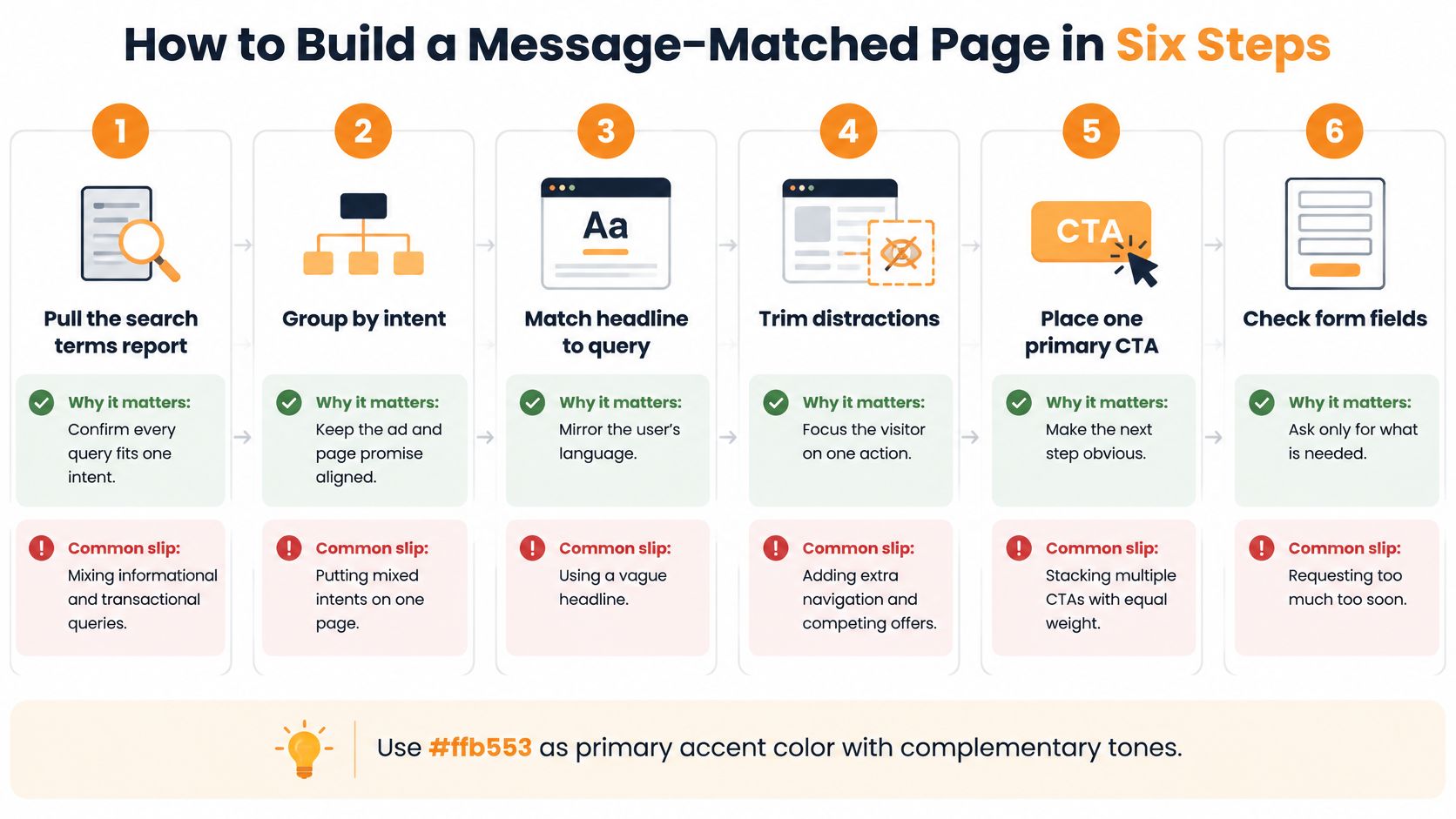
- Pull the search terms report. Read every query in the ad group and keep only those that share one intent. A page can’t teach and sell in the same breath. The slip is leaving “how does this work” next to “buy it today.”
- Write the headline in the query’s words. Put that phrasing in the first line so the visitor recognizes the page in a second. A clever line they don’t recognize feels like the wrong ad.
- Repeat the ad’s offer above the fold. Price, city, or eligibility belongs in the hero. The slip is a hero about the company while the ad promised a quote.
- Use one primary CTA and drop the menu. Repeat that button above the fold and again after the proof. Three equal buttons, plus full site navigation, walk people off the offer.
- Ask only for fields sales will use. A phone lead doesn’t need company size. Each extra field is friction on a phone, and abandoned forms are the usual result.
- Check the final URL and the redirect chain. For Shopping, title, price, currency, and availability on the page must match the feed. A chain of redirects, or a price that shifts after load, breaks the promise the ad just made.
Launch checklist
- Search terms: One intent in the ad group.
- Headline: Query language in line one.
- Hero: Same offer, price, place, or rule as the ad.
- CTA: One verb, shown twice, with the menu removed.
- Form: Only fields a rep will act on.
- URL: Direct final URL, and Shopping fields match the feed.
The step teams skip most often is the final URL and redirect check. The page can read perfectly and still lose the visit on a slow hop.
Layout and CTA Patterns That Fit the Offer
Choose the layout around the offer and the buyer’s next decision. A quote, trial, product purchase, and high-ticket lead each need a different page structure.
| Offer type | Above-the-fold layout | Primary CTA | Form fields |
|---|---|---|---|
| Local service quote | Service area, phone number, short form | Get a quote | Name, phone, ZIP code |
| SaaS free trial | One benefit line, product screenshot, pricing range | Start free trial | Email only |
| Ecommerce product | Product image, price, delivery date, add-to-cart | Add to cart | No form, checkout controls only |
| B2B consultation | Problem statement, two proof points, case study | Book a call | Name, company, role, budget band |
| High-ticket lead | Qualifying questions before the form | Check eligibility | Five to seven fields in steps |
What changes after an AI summary
Google reported that AI Overviews increased Google usage by more than 10% for relevant query types in major markets, including the U.S. and India, in 2025.
A visitor arriving after an AI summary may already understand the basics. Put decision-making proof near the top: a price range, eligibility rule, review count, or comparison point. Keep longer explanations in a short FAQ, and use specific details about the offer to answer questions a generic summary cannot.
The CTA should match both the ad and the next step. “Get a quote” suits a short quote request; “Book a call” makes sense when the next step is a call. “Contact us” leaves the outcome unclear. For practical ways to fix common form design mistakes, review the fields and labels alongside the landing page design practices aimed at conversions.
Page length depends on the decision. A high-ticket buyer may need more proof and objection handling; a low-cost offer may work better with fewer sections. Test one change at a time, such as moving a proof element higher, and compare form starts with qualified leads.
A video walkthrough of message-matched pages is embedded below.
Match the CTA verb to the ad. If the ad promised a quote, the button should ask for a quote.
Load Speed Targets for Mobile Paid Traffic
Speed is a conversion constraint, not a vanity score. Passing a lab test doesn’t prove the paid click will convert.
| Metric | Target | What it tells you |
|---|---|---|
| Largest Contentful Paint | 2.5 seconds or less | Real-user load time for the main content |
| Interaction to Next Paint | 200 milliseconds or less | Responsiveness of taps and form inputs |
| Cumulative Layout Shift | 0.1 or less | Whether buttons and fields move while loading |
| Usable on mid-range device over 3G | 5 seconds or less | Google’s recommended target for slow networks |
| Usable over 4G | 3 seconds or less | Google’s recommended target for fast mobile networks |
| Mobile speed score in Google Ads | 1 to 10, 10 is fastest | Prioritises which pages to fix first |
Google’s Core Web Vitals guidance treats 2.5 seconds or less for Largest Contentful Paint, 200 milliseconds or less for Interaction to Next Paint, and 0.1 or less for Cumulative Layout Shift as the “good” field-data thresholds. Those marks say the page is eligible for a decent experience. They don’t say leads or revenue will rise because you passed.
Google’s mobile speed guidance for ads reports that 53% of mobile visits are abandoned when a site takes longer than three seconds to load, and that in retail a one-second mobile delay can reduce mobile conversions by up to 20%. The same guidance sets usability within five seconds on mid-range devices over 3G and within three seconds over 4G. Google Ads also shows a mobile-friendly click rate and a 1 to 10 mobile speed score, with 10 as the fastest. Use the score to rank pages that already get paid traffic, not as a trophy.
A four-step speed workflow
Test the exact ad URL on a mid-range phone over the networks your buyers use. Then strip unused tracking, oversized images, render-blocking scripts, and third-party widgets. Confirm readable text, tappable controls, a stable layout, and a short path to the action. If the site runs on WordPress, start with the fixes in this guide to speeding up a WordPress site before you buy another app.
Watch landing-page metrics next to conversions. Three traps show up constantly. Teams polish the desktop score while mobile JavaScript stays slow. They measure server response instead of when the offer is usable. They add chat or extra pixels and the page gets heavier.
These targets are benchmarks, not promised lift. Compare conversion rate, lead quality, revenue per click, and abandonment across load-time bands. Rank paid landing pages by traffic and open the slowest one first.
Don’t trust one speed score. Compare conversion rate and revenue per click by load-time band.
Tracking and A/B Tests That Improve Quality Score
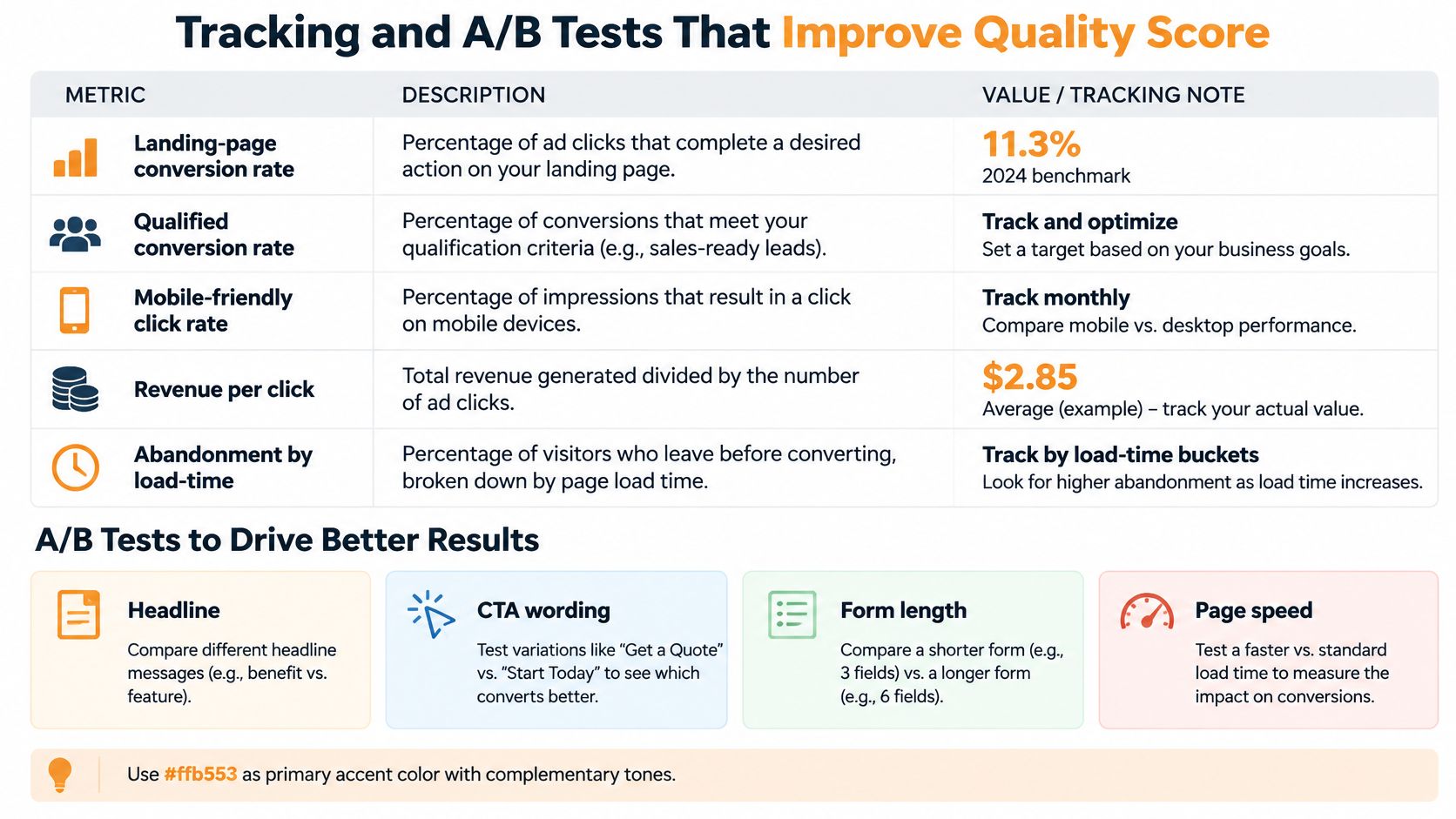
Paid-search landing-page conversion rates vary widely by industry and offer. Judge each page against its own baseline, then compare the quality of the conversions it generates.
| Metric | What to record | How to read it |
|---|---|---|
| Landing-page conversion rate | Leads or purchases divided by clicks | Change versus that page’s baseline |
| Qualified conversion rate | Leads sales accepts, or orders that stick | Whether conversions are valuable |
| Mobile-friendly click rate | Share of mobile clicks on pages Google calls mobile-friendly | Whether phone traffic can use the page |
| Revenue per click | Revenue divided by clicks to that URL | Whether the page pays for the click |
| Abandonment by load-time band | Exits grouped by how long the page took | Where speed is costing sales |
A primary conversion is the lead or purchase. Micro-conversions, such as a phone tap or form start, can show where visitors stall, but only the primary action should drive bidding. If phone taps count as conversions for bidding, low-intent clicks may look like wins. Fire the tag once per action. A double fire inflates the conversion rate and gives the bid strategy a misleading signal.
How a fair test is built
Change one variable on one high-volume intent cluster, such as the headline, first CTA, form length, or page weight. Keep traffic and bids consistent, and run both versions until the difference is more than ordinary fluctuation. Choose a winner by qualified conversion rate and revenue per click, not click volume.
Connect the outcome to Quality Score’s three components. Google Ads Quality Score and its components explain how ad relevance reflects the relationship between the query and ad, while landing-page experience reflects how well the page delivers on the ad’s promise and works on a phone. Expected click-through rate is based on the ad’s clicks against impressions. Compare it before and after a page change, while keeping other account edits out of the test.
Set one primary conversion, then test the highest-cost ad group first.
Judge the winner on qualified conversion rate and revenue per click. Clicks are not the prize.
Run Your First Landing Page Audit This Week
- Day 1. Export the top 20 search terms by cost. Assign each to one intent from the table above, and flag every ad group whose final URL is the homepage.
- Day 2. Run the six-step checklist on the three highest-spend pages. Write down each slip, especially a headline that doesn’t match the ad.
- Day 3. Load those pages on a mid-range phone over a slow network. Log the time until the offer is usable, and set it against the mobile targets.
- Day 4. Confirm the primary conversion fires once per action. Then start one A/B test on the highest-cost ad group.
- Day 5. Split results by device and by load-time band. Pick the single page to fix first next week.
FOMOchat’s landing page optimization guide is a useful second pass on proof, forms, and what to test after this week. A team without spare time can ask an outside reviewer, such as Excellorix’s free Campaign Audit, to check the ad account, competitors, and audience data for performance gaps.
Excellorix designs Google Ads landing pages as part of paid-media work, with message match, mobile speed, one clear action, and conversion tracking built into the page. We also run Search, Shopping, and the rest of the Google Ads mix, then test the page against the keyword group that pays for the click. If your ads and your URLs are out of step, start with a look at Excellorix.