Skip to content



You’ve invested in strong creative, paid traffic, and a product page that should make the sale. Then a shopper taps an ad on a phone, waits for the hero image and product details to appear, taps the size selector, and gets no response. The shopper leaves before the offer has a fair chance.
That situation is why a Shopify speed optimization service should be treated as a revenue and customer-experience discipline, not a quick PageSpeed score exercise. Shopify stores already have a strong platform foundation. Independent ecommerce research published by Shopify in 2024 found that, across nearly 200,000 websites, Shopify stores rendered up to 2.4 times faster than stores on other platforms and averaged 1.2 seconds to render compared with 2.17 seconds on other ecommerce platforms. (Shopify’s ecommerce performance research)
The harder problem starts after a store launches. New apps, campaign tags, review widgets, personalization tools, images, and theme changes can make important templates slower. A useful service must identify what real shoppers experience, prioritize the changes that matter, and keep the store from sliding backward.
This guide will help you understand what a provider should deliver, how Shopify measures field performance, which Core Web Vitals matter, how an optimization engagement works, and how to compare doing the work yourself with hiring an agency. It will also show why app governance often creates a larger opportunity than replacing an otherwise capable theme.
Introduction Why Shopify Speed Decides Revenue
A shopper taps a mobile ad, reaches the right product page, and waits while the opening screen settles. The offer may be strong and the traffic qualified, yet the shopper leaves before seeing enough to act. Analytics can still show healthy visits, making the problem look like weak creative or pricing rather than storefront performance.
Speed shapes several decisions before checkout. A delayed first view creates uncertainty. A layout that shifts as someone taps a variant can cause a mistap. A product page that appears ready but ignores the first interaction makes the store feel unreliable. Shopify’s hosted checkout handles payment, not the storefront experience that earns the trip to checkout.
Shopify recommends a page load time under 3 seconds as a good target in its enterprise guidance, so performance belongs with conversion-rate optimization and search visibility, not in an isolated technical backlog. (Shopify’s page-load guidance) Faster responses also give shoppers more opportunity to browse collections, open galleries, and add products to the cart.
” Revenue perspective: A performance change matters because it changes what shoppers can see and do, not because a testing tool displays a higher score.
Shopify’s 2026 analysis connects each 100 milliseconds of added slowness with a conversion-rate reduction of about 3.5%. (Shopify’s store-speed conversion analysis) That makes small gains worth examining on high-traffic product and collection templates. A Shopify speed optimization service should therefore start with real-user Core Web Vitals field data, then trace poor experiences to specific apps, scripts, assets, or theme behavior.
App governance matters because every new review widget, campaign tag, personalization tool, or tracking script adds another passenger to the page. A provider should show which change improves shoppers’ experience and how the store will prevent performance from slipping again, rather than promising a higher lab score alone.
What a Shopify Speed Optimization Service Actually Includes
A useful analogy is a checkout lane. A lab test places one carefully selected shopper in a controlled lane, using a defined device and connection. Field data observes many shoppers arriving with different phones, browsers, networks, locations, and behaviors. Both views help, but they answer different questions.
A Shopify speed optimization service should combine technical diagnosis with real-user measurement. Shopify’s web-performance system tracks real-user metrics against Google’s Core Web Vitals, and its admin reports expose Largest Contentful Paint, Interaction to Next Paint, and Cumulative Layout Shift for the last 7, 30, or more days. (Shopify’s web-performance reports)
What the provider measures
Shopify reports these scores using the 75th percentile of user experiences. In plain language, the report focuses on the experience of the slower end of normal visitors rather than letting a few fast visits hide a problem. That makes optimization measurable at the store, page, device, and time-range level, instead of turning speed into a one-time technical fix.
A credible engagement usually includes:
- Baseline assessment: The provider records current field performance, key templates, devices, and known business priorities.
- Theme and app audit: The team examines Liquid rendering, CSS, JavaScript, images, fonts, tags, and app injections.
- Prioritized implementation: Developers address bottlenecks according to likely user and business impact, not according to a generic checklist.
- Validation: The team tests changes in a safe theme or controlled release path, checking that merchandising and functionality still work.
- Ongoing monitoring: Reports and regression checks reveal whether later app installs, campaigns, or theme edits weaken performance.
Growing brands often reach a point where a standard theme needs more deliberate customization and governance. This guide to why growing ecommerce brands outgrow standard Shopify themes provides useful context for that transition.
The service isn’t “make the homepage faster.” A product page with several app blocks may need a different intervention from a collection page with heavy filters. A mobile hero image may create an LCP issue, while a desktop interaction may reveal an INP problem caused by JavaScript. The provider should show you which template and device create the constraint, what changed, and how field data responds over time.
Key Performance Benchmarks That Define a Fast Shopify Store
Shopify’s performance guidance uses Google-aligned Core Web Vitals to define a fast store. At the 75th percentile, the targets are LCP at or below 2.5 seconds, INP at or below 200 milliseconds, and CLS at or below 0.10. Shopify also recommends its theme performance summary banner, which tracks those metrics over the last 30 days, to identify regressions and prioritize theme-layer fixes. (Shopify’s web-application performance guidance)
The three primary measures
Largest Contentful Paint, or LCP, measures how quickly the largest main-content element becomes visible. On a Shopify product page, that may be a hero image, product image, or prominent content block. A slow LCP usually points toward image delivery, render-blocking resources, theme structure, or scripts that delay the main visual.
Interaction to Next Paint, or INP, measures how quickly the page responds after a shopper interacts. Product selectors, navigation menus, cart drawers, filters, and app widgets can all contribute. JavaScript bloat matters here because the browser may spend too long processing work before it can respond.
Cumulative Layout Shift, or CLS, measures unexpected movement during loading. A late-loading image without reserved space, a font swap, or an injected promotional element can move buttons and content after the shopper has started reading or tapping.
| Metric | Good threshold | Median Shopify store |
|---|---|---|
| LCP | At or below 2.5 seconds | 2.26 seconds on mobile |
| INP | At or below 200 milliseconds | 153 milliseconds on mobile |
| CLS | At or below 0.10 | 0.01 on mobile |
The median values in this table come from an independent benchmark of a 1,000-store Shopify sample. Only 48% of stores in that sample met all three Core Web Vitals thresholds on mobile, which suggests that passing one metric doesn’t guarantee a reliable overall experience. (Sherocommerce Shopify speed benchmarks)
How to read the supporting signals
TTFB, or time to first byte, helps indicate how quickly the browser receives the initial response. FCP, or First Contentful Paint, shows when the first visible content appears. They can help diagnose the path to LCP, but your provider should connect them to the actual bottleneck rather than optimize an isolated number.
The benchmark pattern offers a practical priority order. Mobile CLS is already healthy at the median, while LCP remains the more common failure point. Start with the metric that fails in the field, then trace the resources and template behavior responsible for it.
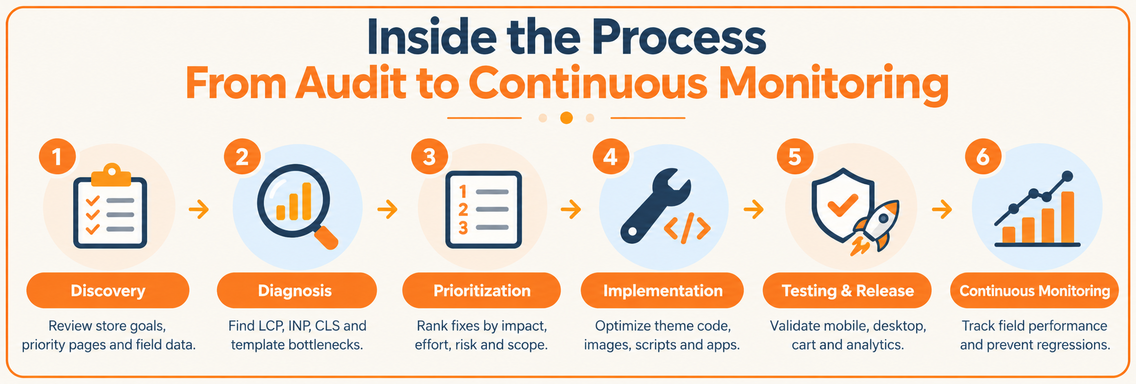
Inside the Process From Audit to Continuous Monitoring
A serious engagement follows a connected workflow. The provider first learns how the store makes money, then identifies the performance constraint, implements changes in priority order, validates the result, and monitors the live experience. That sequence matters because a technically clean change can still hurt merchandising, analytics, or a product-page interaction if nobody tests the full customer path.
Discovery and diagnosis
Discovery should connect speed to store priorities. A provider may ask which templates drive revenue, which devices dominate traffic, which apps are business-critical, and whether a campaign or redesign is approaching. The output should be a documented baseline, not just a list of generic recommendations.
The audit then examines field data and technical evidence. Shopify reports show where real-user performance is weak, while browser tools and theme inspection help explain why. A useful audit identifies the LCP element, long interaction tasks, layout-shift sources, blocking resources, app scripts, and template-specific differences.
Prioritization and implementation
The provider should rank issues by expected impact, effort, risk, and scope. Removing an unused global script may help several templates, while changing a product-gallery behavior may affect only product pages. This ranking helps you avoid spending development time on a visually obvious issue that has little effect on field performance.
Implementation typically happens in a duplicate theme or controlled development environment. The fix log should record what changed, where it changed, what functionality was checked, and what measurement will confirm success. Deliverables can include an audit report, prioritized backlog, implementation notes, test results, and a before-and-after field-data plan.
Testing, release, and monitoring
Testing should cover mobile and desktop experiences, product pages, collections, navigation, cart behavior, search, promotions, and analytics events. The team should also compare lab results with Shopify’s real-user reports, because a controlled test can improve while visitors experience a different result.
After launch, monitoring turns the project into an operating practice. Regression alerts or scheduled reviews can flag a new app, campaign tag, image pattern, or theme edit that changes the experience. Ask for a reporting view that shows performance by template and device, plus a clear owner for investigating future declines.
Technical Checklist That Drives Real User Improvements
Speed work becomes more effective when you organize it by impact area. A long list of isolated recommendations can distract a team from the largest bottleneck. A better checklist starts with the resources that delay the first useful view, then addresses interaction work, layout stability, and the governance practices that prevent new problems.
Images and media
Start by matching media to its actual display role. A large product image that arrives far bigger than the visible container can delay LCP, while below-the-fold media can often load only as it approaches the viewport. Shopify’s image delivery features and responsive image settings can help, but the implementation still needs review at the theme level.
Check hero images, product galleries, collection cards, promotional banners, video embeds, and background images. Reserve layout space so media doesn’t push content around after loading. Don’t apply lazy loading to the primary above-the-fold element without understanding how that affects LCP.
Theme and Liquid
Review the sections and snippets that render on important templates. Repeated data work, unnecessary markup, unused CSS, and duplicated components can increase the amount of work the browser and theme must handle. The Shopify Theme Inspector can help developers locate slow Liquid blocks and examine whether a custom section does more work than the page needs.
A theme swap may improve the starting point, but it can also create migration work and new compatibility issues. Clean, targeted changes are often safer when the current theme already supports the store’s merchandising needs.
JavaScript and app governance
Third-party apps, tag managers, and marketing scripts deserve their own ownership process. Shopify’s guidance recommends reviewing apps, third-party code, and tags to confirm that they still add value. (Shopify’s theme performance data guidance)
For each app, document its purpose, pages loaded, business owner, measured value, and removal or loading options. Defer noncritical scripts where functionality allows, prevent global loading for page-specific features, and test the first interaction after every change. This is especially important for INP, while scripts that compete with hero rendering can also affect LCP.
Fonts and recurring controls
Load only the font weights and formats the design needs above the fold. Use font-display strategies that let readable text appear while the intended font loads, and avoid preloading every font asset. Review analytics, chat, reviews, consent tools, and campaign tags whenever a new tool enters the stack.
A Shopify design approach focused on conversions and speed reinforces the practical connection between page structure, user action, and performance. The ongoing rule is simple: every new script or visual feature needs a performance owner before it reaches production.
Pricing Timelines and How to Choose the Right Agency
Pricing for a Shopify speed engagement depends on scope rather than on the phrase “speed optimization” alone. A focused audit costs less effort than a complex implementation across custom product templates, several apps, multiple markets, and a recurring monitoring program. Timelines also expand when the provider must preserve custom merchandising, coordinate with app developers, or test a redesign at the same time.
DIY versus professional delivery
| Criteria | DIY approach | Professional service |
|---|---|---|
| Initial diagnosis | Merchant reviews reports and browser tests | Specialist combines field data with theme and app analysis |
| Code changes | Internal team works within its Shopify expertise | Shopify developers implement and document targeted fixes |
| App governance | Often informal and reactive | Apps, tags, owners, scope, and loading behavior are reviewed systematically |
| Testing | Usually based on a few manual checks or lab scores | Controlled testing covers templates, devices, functionality, and field validation |
| Ongoing ownership | Depends on internal capacity | May include dashboards, reviews, and regression support |
| Best fit | Stores with technical resources and limited complexity | Stores where performance affects growth or the stack is difficult to diagnose |
DIY work can make sense when a founder has developer support, a manageable theme, and enough time to investigate the cause rather than apply random changes. It becomes risky when the store is app-heavy, campaign activity is frequent, or a change could affect cart behavior and analytics.
Professional help should begin with evidence. Ask for a sample report showing field metrics, page-level findings, a fix log, and the method used to validate changes. A provider that only promises a high Lighthouse or PageSpeed score isn’t giving you enough information to judge shopper experience.
Questions for agency selection
Ask how the team handles app scripts, whether it can isolate global code from page-specific code, how it protects the live theme, and how it distinguishes mobile from desktop problems. Request clarity about what the engagement includes after launch, including monitoring, documentation, and responsibility for regressions.
You should also ask how the provider connects performance to commercial priorities. A Shopify setup for growing online stores may require broader development and conversion support, while another store may need a narrowly defined technical cleanup. Choose the partner whose process matches the actual constraint, not the agency with the most attractive score screenshot.
ROI Examples and Your Next Steps to a Faster Store
A shopper who waits for a product page to respond may leave before reaching the cart. Faster loading helps customers see products sooner, use selectors and navigation with less friction, and complete checkout with greater confidence. It also supports search visibility and user experience, but speed should strengthen merchandising and content, not replace them.
ROI is clearer when you connect field data with valuable templates. A small improvement on a frequently visited product page can matter even if the page feels acceptable in a quick manual test. Review the store’s conversion rate, average order value, and traffic for that template, then estimate the revenue at risk from lost visits. This makes a speed project a commercial decision rather than a race for a lab score.
Use this action plan:
- Record the baseline: Review Shopify field reports by page, device, and time range.
- Find the constraint: Identify whether LCP, INP, or CLS is failing on priority templates.
- Audit the stack: List apps, tags, scripts, media, fonts, and theme sections. Question global resources without a clear purpose.
- Prioritize safely: Apply high-impact fixes in a duplicate theme and test browsing, cart, and checkout flows.
- Monitor after release: Compare field data over time, especially after campaigns, app installations, and theme edits.
Choose a provider that can identify which real shoppers struggle, explain the proposed fix, and protect the gain after launch. A polished Lighthouse result alone does not show that customers improved.
Excellorix provides Shopify performance improvement, theme customization, ecommerce development, and conversion-focused optimization within its growth marketing services. Visit Excellorix to discuss a field-data-led speed audit and a practical improvement plan.