Skip to content



A perfect PageSpeed score won’t pay your invoices. A site can perform well in a synthetic test and still feel slow to real visitors, delay interactions, shift its layout, or lose conversion data because an aggressive optimization removed a tracking script. A credible WordPress speed optimization service treats speed as a business system, not a plugin installation exercise.
The right question isn’t, “Can this site reach 100?” It’s, “Which performance problem is costing us visibility, qualified leads, completed purchases, or reliable measurement?” That shift changes what gets audited, what gets fixed, and how success gets reported.
Redefining WordPress Performance Beyond Lab Scores
A synthetic test loads a page under controlled conditions. Your customers use different devices, networks, browsers, locations, and interaction patterns. Those experiences can differ sharply from a clean laboratory run, which is why a high score alone doesn’t prove that your audience is receiving a fast, stable website.
Google evaluates real-user field data through Core Web Vitals, including Largest Contentful Paint, Interaction to Next Paint, and Cumulative Layout Shift. The WordPress performance team reported that the overall passing rate across WordPress sites rose from 28.31% to 36.44% on mobile and from 32.55% to 40.80% on desktop in 2023, while a 2026 industry summary reported pass rates of 53.3% on desktop and 48.8% on mobile across its measured origins. The same summary reports desktop pass rates rising from 18.2% in June 2020 to 53.3% in June 2026, a gain of 35.1 percentage points. See the WordPress Core Web Vitals industry summary for the reported field-data trend.
That history matters because professional optimization targets the conditions visitors encounter. It doesn’t stop at minifying files or activating a cache. It identifies whether the mobile hero image renders late, whether JavaScript blocks interaction, or whether a font causes content to jump after the page appears ready.
What lab scores miss
A speed provider should compare laboratory diagnostics with field data, server response behavior, page templates, and conversion paths. A homepage score may look acceptable while product pages, checkout screens, appointment forms, or campaign landing pages remain slow.
Your provider should also inspect what optimization might break:
- Analytics continuity: Confirm that Google Analytics, Google Tag Manager, advertising pixels, consent tools, and conversion events still fire correctly.
- Interface behavior: Test menus, filters, product variants, forms, chat tools, and checkout elements after delaying or deferring scripts.
- Commercial visibility: Protect above-the-fold headlines, calls to action, trust signals, and product imagery instead of removing them to improve a benchmark.
- Mobile interaction: Test real touch behavior and responsiveness, not only whether a desktop browser completes a page load.
” Practical rule: A score is a diagnostic signal. Revenue, completed actions, clean attribution, and stable user experiences are the business results.
For a useful second opinion, review this guide to what business owners often miss when evaluating website performance. It reinforces the central buying criterion: hire a team that can explain why a change matters commercially, not just technically.
The Direct Revenue Impact of Faster Load Times
Fast pages do more than improve a lab score. They protect the moments when visitors choose whether to continue, submit, buy, or leave. Widely cited web-performance research associates a 1-second delay with a 7% reduction in conversions, while Walmart reported that improving page load time by 1 second increased conversions by 2%. Amazon found that every 100 milliseconds of latency cost about 1% in sales. These findings are summarized in LogicMonitor’s web performance statistics.
Those figures are reference points, not promises for every WordPress site. The business case is more practical: latency interrupts product research, form completion, checkout, and conversion tracking. A visitor who waits for a page, struggles to interact with a form, or sees the layout shift beneath a finger has another reason to abandon the session before the business records a conversion.
Treat a performance engagement like a paid media or landing-page project. Start with pages responsible for revenue or pipeline, then connect the technical baseline to business measurements. A faster page that breaks consent handling or conversion events is not an improvement.
Where the economics show up
For ecommerce, faster rendering can support product discovery, add-to-cart behavior, and checkout completion. SaaS companies can reduce friction on signup, demo, and pricing pages. Professional services, healthcare, and industrial businesses can make forms and contact paths easier to complete, particularly on mobile devices.
A performance summary associated pages loading in 1 second with a 3.05% conversion rate, compared with 1.08% at 6 seconds. The performance summary reporting these conversion comparisons provides a useful way to frame the opportunity, without promising a predetermined lift.
A practical ROI model
Use your own baseline to decide whether optimization deserves investment:
- Record visits to affected landing pages or commercial templates.
- Identify the current conversion rate and completed conversion volume.
- Assign a defensible value to each purchase, qualified lead, demo, or booked appointment.
- Compare the engagement cost with the value of incremental conversions you could reasonably test.
- Validate the result against analytics, consent behavior, lead quality, and revenue, not only a test score.
A speed project may improve search performance and conversion efficiency, but neither result deserves credit until measurement proves the change. Require the provider to show the baseline, document each intervention, and isolate post-change behavior. Without that evidence, you are buying activity rather than accountability.
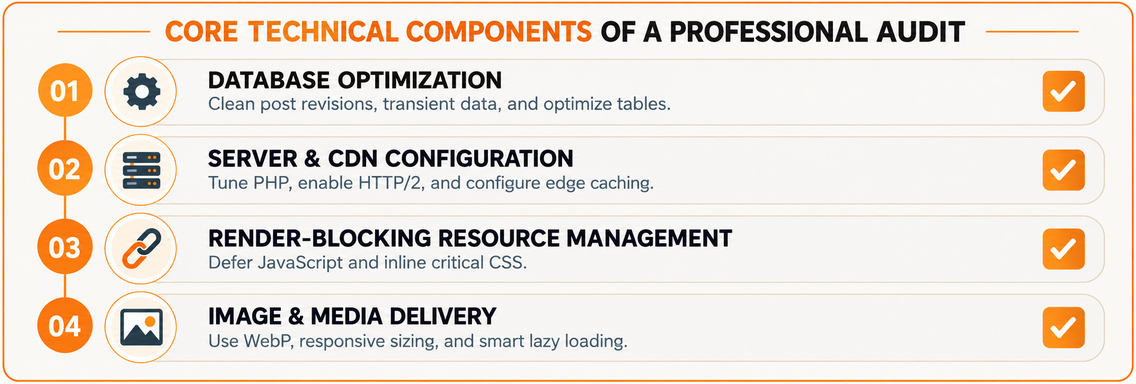
Core Technical Components of a Professional Audit
Installing a caching plugin is a tactic, not an audit. A professional engagement begins by locating the bottleneck across the hosting layer, WordPress application, database, front end, media library, and third-party services.
Start with the server and cache path
Page-level caching often produces the biggest early improvement for anonymous traffic because it can bypass PHP execution and database queries, returning prepared HTML directly from cache. Independent benchmark reporting cited in this WordPress performance guide describes cached pages achieving a median TTFB of 106 milliseconds across 5.7 million pageviews. The same guidance treats TTFB above 600 milliseconds as poor and a reason to investigate hosting or caching first.
A capable provider should implement and verify layered caching:
- Server page cache: Serve prebuilt HTML for eligible visitors and confirm cache HIT behavior in response headers.
- Browser caching: Keep static CSS, JavaScript, fonts, and images available locally for returning visitors.
- Object caching: Reduce repeated database work where the site’s application architecture benefits from it.
- Edge delivery: Use a CDN or edge layer where geographic distribution and asset delivery justify it.
The work doesn’t end when a cache is enabled. Logged-in states, carts, personalized content, consent conditions, and checkout pages need explicit exclusions so performance changes don’t create functional errors.
Then inspect WordPress and the database
The audit should review plugins, themes, scheduled tasks, post revisions, transient data, database tables, autoloaded options, and expensive queries. Removing unused extensions can help, but replacing a plugin without testing its features is careless. The objective is to reduce unnecessary work while preserving editorial workflows, ecommerce logic, security, and marketing functionality.
A useful audit also separates WordPress-originated problems from infrastructure problems. Slow PHP workers, insufficient resources, database contention, poor cache configuration, and inefficient queries require different remedies. A provider that recommends only front-end changes hasn’t diagnosed the whole stack.
Control the browser workload
Front-end work typically includes responsive image sizing, modern image formats, compression, lazy loading below the initial viewport, critical CSS, and selective JavaScript deferral. Third-party scripts deserve special scrutiny because analytics, advertising, chat, personalization, reviews, heatmaps, and consent tools can compete with the page’s essential rendering and interaction work.
Use this complete web audit guide for 2026 when assessing whether a prospective provider examines business-critical functionality alongside technical performance. The strongest deliverable is a prioritized remediation plan with owners, risks, test conditions, and a clear explanation of what shouldn’t be changed.
Aligning Technical Fixes with Core Web Vitals
Core Web Vitals gives a WordPress speed optimization service a practical prioritization system. Google’s “good” thresholds are LCP at or below 2.5 seconds, INP at or below 200 milliseconds, and CLS at or below 0.1, measured at the 75th percentile of real-user field data. The thresholds and metric-focused approach are summarized in this WordPress performance optimization guide.
Don’t treat all three metrics as one generic “speed” problem. Each points to a different class of work.
If LCP is failing
LCP usually requires attention to the largest visible element that defines the initial experience. On a WordPress site, that may be a hero image, a large heading block, a featured product image, or a rendered content section. The provider should inspect image priority, responsive sizing, preload decisions, server response, critical CSS, font delivery, and template weight.
Compressing every image isn’t a strategy if the largest element still arrives late. The fix should target the actual LCP element on the pages that matter commercially.
If INP is failing
INP exposes interaction delays. Heavy JavaScript, oversized page builders, inefficient event handlers, third-party widgets, filters, sliders, and consent interfaces can all compete for the main thread. Deferring or delaying scripts may help, but only after the team identifies which interactions matter and verifies that forms, navigation, checkout, and tracking still work.
If CLS is failing
CLS reflects unexpected layout movement. Common causes include images without reserved dimensions, late-loading fonts, advertisements, banners, embedded content, and dynamically inserted interface components. The provider should reserve space, stabilize media dimensions, manage font loading, and test the page during actual rendering.
” Measurement beats guesswork: Fix the failing field metric first, then verify the result across priority templates and critical conversion paths.
The trade-off is where inexperienced providers create damage. Removing analytics tags can improve a lab trace while destroying attribution. Hiding a conversion element can improve visual timing while lowering response. A technically valid change isn’t commercially valid until it passes functional, tracking, consent, and conversion checks.
Evaluating Provider Models and Pricing Structures
The right engagement depends on the site’s complexity, internal capability, release process, and tolerance for ongoing regression. A small brochure site with stable templates may need a focused audit and implementation plan. A WooCommerce store, membership platform, or lead-generation operation with frequent campaigns needs continuous monitoring because new products, plugins, scripts, and content can reintroduce performance problems.
| Engagement Model | Core Deliverables | Best Suited For |
|---|---|---|
| One-time technical audit | Field and lab review, bottleneck diagnosis, prioritized remediation roadmap | Teams with capable developers who need direction |
| One-time implementation | Caching, media, database, script, and server improvements with validation | Businesses that need an expert to execute a defined fix |
| Ongoing maintenance retainer | Monitoring, regression checks, updates, issue resolution, and recurring tuning | Sites that change frequently or support active revenue channels |
| Unified growth engagement | Performance work connected to analytics, CRO, SEO, landing pages, and paid media | Growth-focused businesses managing acquisition and conversion together |
Judge the operating model, not the sales deck
Ask how the provider establishes a baseline, protects production, tests changes, and reports outcomes. A serious team should use a staging environment where appropriate, document exclusions, preserve rollback options, and explain which changes carry functional risk.
Look for reporting that connects technical indicators to business outcomes. A useful report may include field metrics, template-level findings, cache behavior, JavaScript impact, conversion-event validation, and unresolved constraints. A screenshot of a synthetic score isn’t enough.
Pricing should reflect risk and scope
Avoid choosing solely by the lowest quote. A provider may charge for a quick plugin configuration while ignoring hosting, database queries, third-party scripts, or template-specific problems. Another may propose a broad rebuild when targeted remediation would solve the issue. The correct price depends on access, site architecture, number of templates, ecommerce or membership complexity, release controls, and whether ongoing measurement is included.
The strongest commercial model treats speed as part of the acquisition system. Better rendering can support SEO and landing-page usability. Cleaner tracking can improve campaign decisions. More stable pages can help CRO testing. Those effects can influence CAC and ROAS, but your analytics must distinguish correlation from causation.
The Case for a Unified Growth Partner
Fragmented vendors create a predictable risk. A speed specialist delays a script that a paid media team uses for attribution. A developer removes a tag that a CRO team needs for experimentation. An ad agency sends traffic to a landing page whose hero section, form, or consent layer becomes unstable after a performance release.
One accountable team can evaluate those trade-offs before production. That’s the case for a unified growth partner, particularly when development, analytics, paid media, SEO, and conversion optimization share the same commercial targets.
One backlog, connected decisions
A unified operating model should connect four decisions:
- Discovery and alignment: Map revenue goals, priority audiences, conversion actions, technical constraints, and measurement requirements.
- Integrated execution: Improve caching, rendering, media, and scripts without breaking campaign URLs, events, consent behavior, or landing-page design.
- Holistic measurement: Review performance data alongside traffic quality, lead completion, purchases, and funnel movement.
- Strategic iteration: Use the combined evidence to determine what the next optimization cycle should address.
This isn’t an argument for changing every vendor relationship. It’s an argument for assigning one team responsibility for the interaction between systems. Excellorix offers WordPress development, performance tuning, SEO, paid media, conversion optimization, analytics implementation, and ongoing support within a broader growth-marketing model. For a business already managing several of those functions, that coordination can reduce the chance that one optimization undermines another.
” The standard to demand: No performance release is complete until the page is faster, the experience still works, and the business can trust the data.
A unified partner should still be held to clear boundaries. Require documented access controls, staging or rollback procedures, named owners, issue escalation, and reporting that separates technical improvements from broader marketing changes. Integration is valuable only when it produces accountability rather than a larger bundle of vague services.
Next Steps for Hiring Excellorix
Start with evidence, not a sales promise. Before contacting a provider, gather representative URLs from your homepage, highest-value landing pages, product or service pages, forms, and checkout flow if applicable. Record current field data where available, recent campaign performance, conversion events, major plugins, hosting details, and any known site changes.
Prepare the discovery conversation
Give the provider a clear commercial brief:
- Business priorities: Identify whether the immediate concern is ecommerce revenue, qualified leads, booked appointments, signup completion, organic visibility, or a combination.
- Technical access: Prepare the appropriate WordPress, hosting, CDN, analytics, tag-management, and advertising access, with permissions limited to what the team needs.
- Known symptoms: Describe slow templates, mobile complaints, unstable layouts, delayed interactions, failed events, or performance regressions after updates.
- Operational constraints: Note launch dates, campaign schedules, compliance requirements, approval processes, and pages that cannot change visually.
- Success criteria: Define the field metrics, conversion actions, tracking checks, and reporting cadence that will determine whether the work succeeded.
The initial audit should separate symptoms from causes. It should show whether the largest constraint sits in hosting, caching, WordPress execution, database work, media delivery, render-blocking resources, or third-party code. It should also rank fixes by commercial importance and implementation risk.
Move through controlled remediation
A sensible delivery sequence starts with a baseline, then applies server and caching changes, addresses the largest front-end bottlenecks, validates priority interactions, and monitors field behavior after release. Don’t approve a production change without a rollback plan, especially when it affects JavaScript execution, personalization, consent, checkout, or analytics.
For businesses that need broader continuity, WordPress support and management from Excellorix can be evaluated alongside a targeted performance engagement. Ongoing support makes sense when updates, new content, campaign pages, plugins, and integrations regularly change the performance profile.
Ask for a final report that includes what changed, why it changed, what was tested, which metrics moved, what remains constrained, and what the team recommends next. That documentation turns a one-time technical project into an operating baseline your marketing and development teams can use.
Excellorix helps growth-focused businesses improve WordPress speed, Core Web Vitals, tracking reliability, and conversion paths through coordinated development, analytics, SEO, CRO, and paid media support. Visit Excellorix to discuss a revenue-aligned performance audit and a practical optimization plan for your site.