Most ecommerce email advice starts in the wrong place. It tells you to send more newsletters, improve subject lines, and watch open rates climb. That approach can create plenty of activity without proving that email generated a single incremental order.
A revenue-first email marketing for ecommerce program works differently. It prioritizes inbox placement, behavior-triggered automation, useful customer data, and measurement that connects delivered messages to contribution margin. Broadcast campaigns still have a role, but the compounding value usually comes from responding to what shoppers do, then controlling how often, why, and where you contact them.
Table of Contents
- Why Automated Flows Outperform Broadcast Campaigns
- Architecting Your Core Lifecycle Automation Engine
- Engineering High-Converting Cart Recovery Sequences
- Securing Inbox Placement and Sender Reputation
- Designing Governed and Transparent Personalization
- Measuring Incremental Lift and True Commercial Impact
Why Automated Flows Outperform Broadcast Campaigns
A campaign scheduled for an entire list treats a subscriber who just viewed a product the same way it treats a customer who bought yesterday and someone who hasn’t engaged in months. That isn’t personalization. It’s distribution.
Automated flows respond to an event, such as a signup, product view, cart abandonment, purchase, or replenishment signal. The message arrives while the shopper’s intent is still relevant, which can make timing and context more valuable than sending volume.
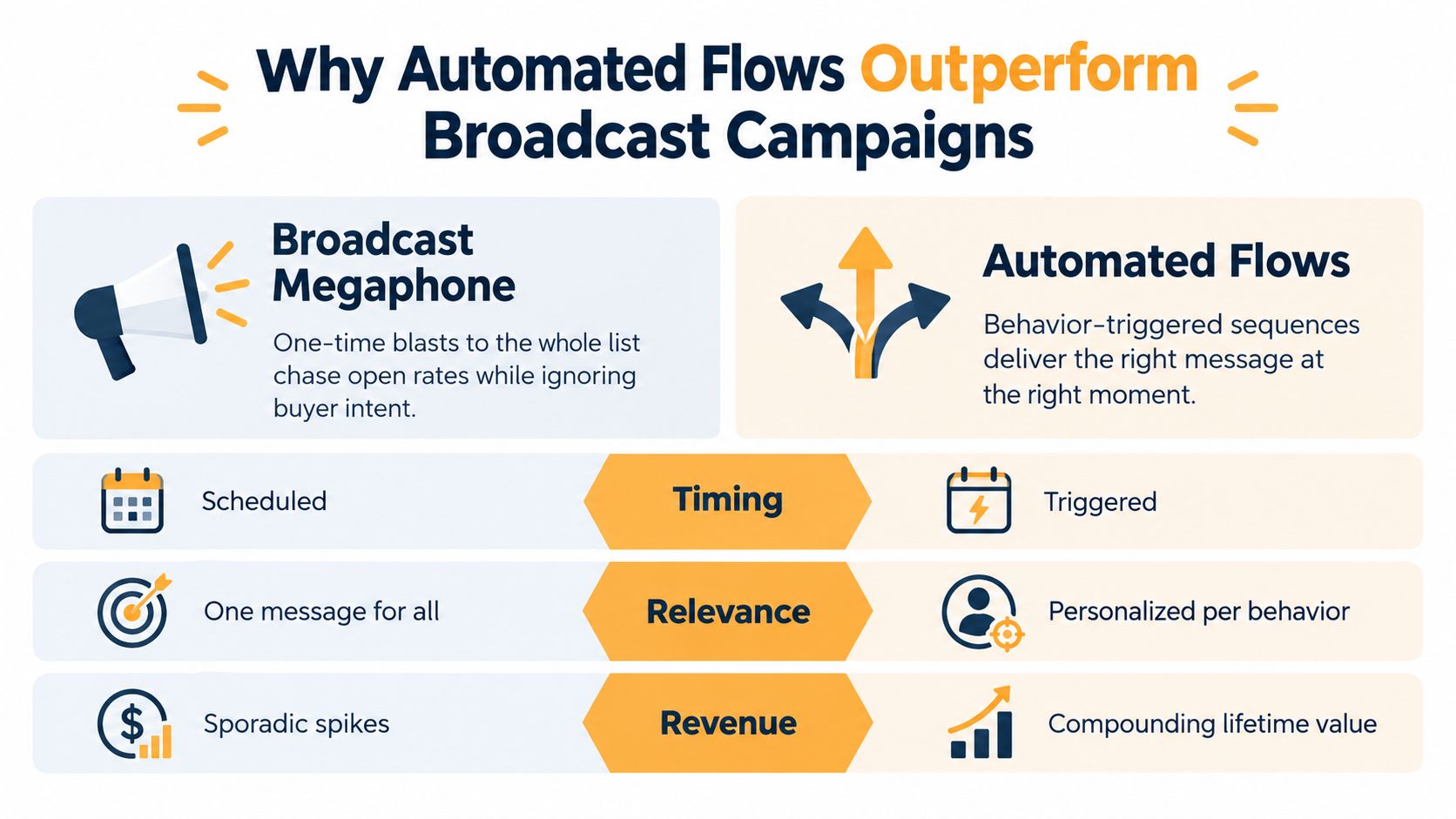
A 2025 benchmark summarized by ClickMinded reported that automated emails generated an average of $3.41 in revenue per email and a 1.49% conversion rate, compared with $0.155 in revenue per campaign email and a 0.08% campaign conversion rate. The comparison was approximately 22 times higher for revenue per email and approximately 19 times higher for conversion rate for automated messages, according to ClickMinded’s email marketing benchmark summary.
Those figures aren’t a promise for every Shopify store. Attribution rules, ecommerce tracking, industry mix, and last-click versus assisted revenue can change the result. They do establish a useful operating principle: customer intent and timing often matter more than send volume.
Separate the jobs of flows and campaigns
Newsletters and promotions are useful for launches, seasonal merchandising, education, and controlled offers. Flows handle recurring lifecycle moments:
- Welcome sequences: Turn a new subscriber’s attention into a first purchase without waiting for the next campaign.
- Browse and cart recovery: Respond to demonstrated product interest and incomplete checkout behavior.
- Post-purchase journeys: Set expectations, reduce uncertainty, and create a reason to return.
- Replenishment and back-in-stock alerts: Match communication to product availability or likely buying needs.
- Win-back programs: Re-engage lapsed buyers with context from their prior relationship.
Measure these programs separately. A blended email dashboard can hide a weak newsletter behind a strong cart flow, or make an automated sequence appear successful because it claimed orders that would have happened anyway. Track placed orders, revenue per recipient, unsubscribe rate, and incremental lift for each program.
Practical rule: Use campaigns to create planned demand, and flows to respond to existing intent.
Architecting Your Core Lifecycle Automation Engine
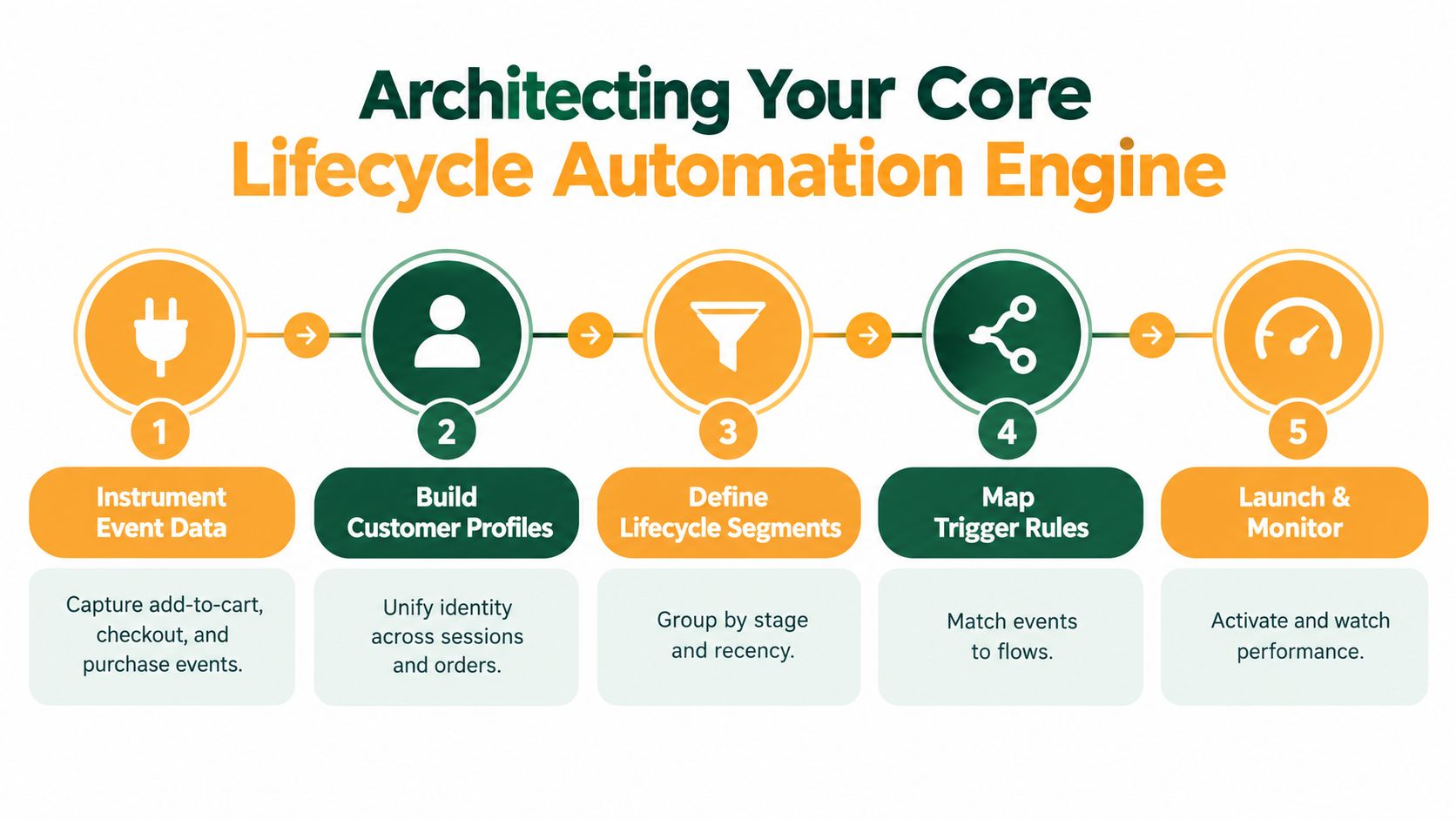
Copy is downstream of data. Before writing a subject line, confirm that your store can identify the event, associate it with the right person, and stop the message when the customer’s state changes.
For a Shopify or similar store, capture events such as signup, product view, add-to-cart, checkout start, purchase, fulfillment, delivery, refund, and unsubscribe. Each event should carry enough context to make a decision, including product category, product IDs, order value, currency, consent region, checkout URL, predicted replenishment date, and customer lifetime value where available.
Build states before segments
A segment is only useful when it represents a meaningful customer state. Start with a small lifecycle model:
- Subscriber: Has opted in but hasn’t purchased.
- First-time buyer: Has placed an initial order and needs a confident path to a second purchase.
- Repeat buyer: Has established buying behavior and may respond to complementary products or replenishment prompts.
- Lapsed buyer: Has stopped purchasing relative to the store’s normal buying cycle.
- High-value customer: Deserves distinct service, access, or recognition, but not indiscriminate discounting.
Your flow logic should prioritize state changes. A purchase must suppress active cart recovery immediately. A refund should prevent an inappropriate review request. A new order should reset replenishment timing where the product cycle supports it.
Sequence the essential programs
Build the welcome, post-purchase, browse and cart recovery, replenishment, back-in-stock, and win-back flows in an order that reflects your data quality. Don’t launch every automation at once if your identity resolution or suppression logic is unreliable.
A strong implementation also needs frequency caps across workflows. Without them, a shopper can receive a campaign, browse message, cart reminder, and post-purchase recommendation in a compressed period. The result is often fatigue rather than relevance.
For broader implementation context, see Excellorix’s Shopify marketing strategy guide, which connects store data, conversion work, and lifecycle activity.
A large 2025 Omnisend analysis covering more than 20 billion campaign emails, 470 million automated sends, and over 27,000 brands reported $3.41 per automated email versus $0.155 per campaign email, as documented in Omnisend’s ecommerce email benchmarks. Treat that as directional evidence, not a guaranteed outcome. Trigger quality, merchandising, consent, deliverability, and measurement design determine what your store can realize.
Engineering High-Converting Cart Recovery Sequences
A cart recovery flow shouldn’t be a single email followed by an automatic discount. That setup throws away information about why the shopper left and trains customers to delay checkout.
Start by capturing the cart event accurately. Store the product IDs, prices, currency, consent status, and checkout URL, then render the current product and pricing data at send time rather than relying on stale template values. The workflow must check for a purchase before every message, not only when the shopper first enters the flow.
Separate friction from price sensitivity
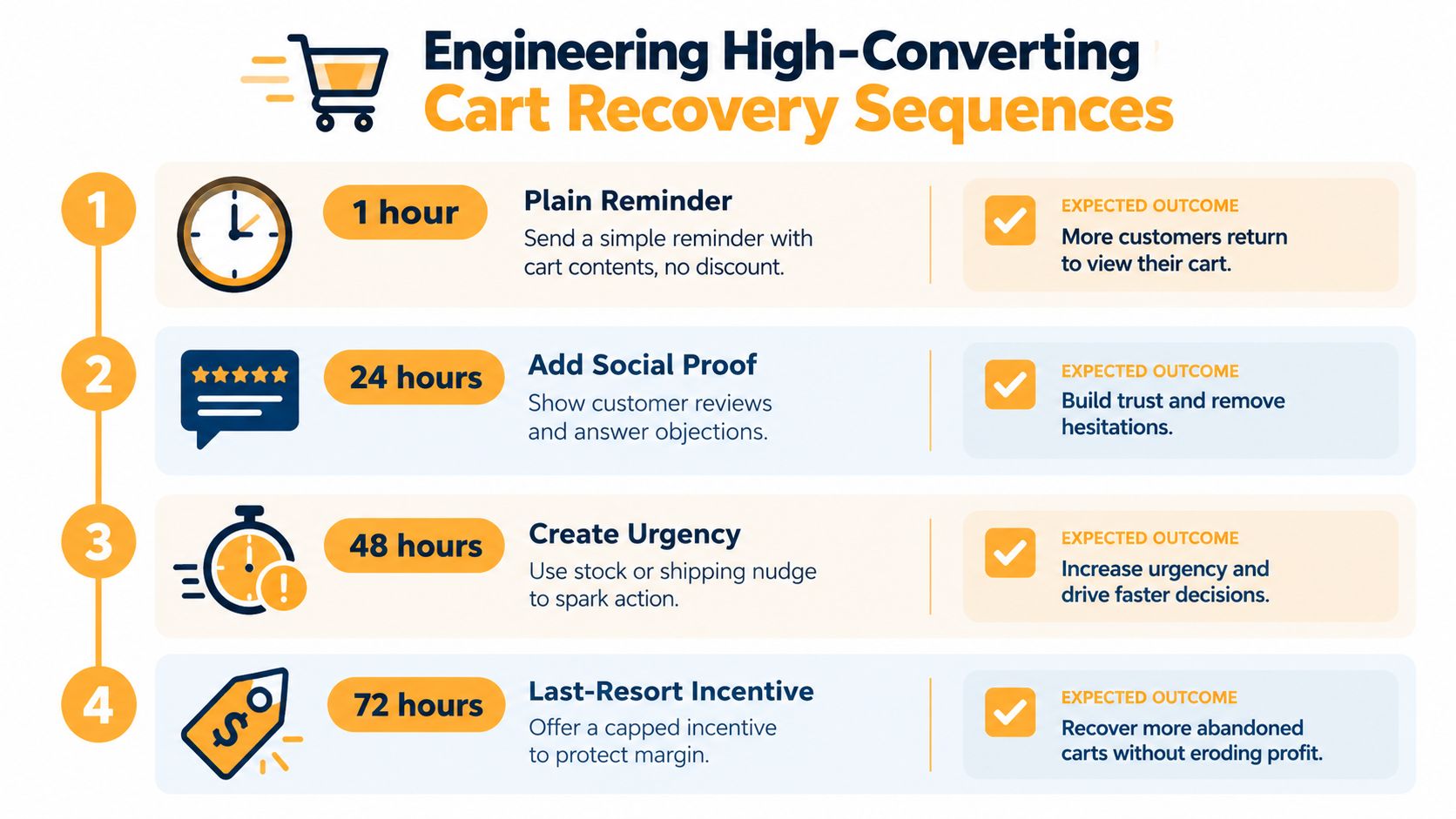
The first message should make returning easy. Show the cart contents, use a deep link that restores the session correctly, and avoid an incentive when the shopper may just have been interrupted.
The next message can address objections with product information, reviews, shipping details, or reassurance. Later messaging can create legitimate urgency around availability or delivery. A final incentive, if appropriate, should be restricted by margin, cart value, customer history, and discount sensitivity.
Test the variables independently:
- Timing: Compare delays without changing the creative or offer.
- Incentive eligibility: Reserve discounts for segments that need them rather than rewarding every abandoner.
- Deep links: Confirm that the shopper returns to the intended cart or checkout state.
- Message content: Test reminders, objection handling, social proof, and urgency separately.
- Suppression: Verify that every completed order exits the flow immediately.
A benchmark covering more than 143,000 automated flows reported a 50.5% average open rate, 6.25% click rate, 3.33% placed-order rate, and $3.65 average revenue per recipient for abandoned-cart emails, according to CartFlows’ cart abandonment benchmark. Those results are directional. Sector, list quality, inventory, consent practices, deliverability, device mix, and attribution windows can materially change performance.
Fix the failures that quietly erase revenue
Repeated cart events can create duplicate sends. Inventory can sell out after the event but before the email renders. A broken session link can force the shopper to rebuild the order. A missing purchaser exclusion can make the brand look careless.
Use a randomized holdout group to estimate whether the flow creates additional orders rather than merely claiming purchases from high-intent shoppers. Track incremental orders and profit per recipient, not only clicks or opens. For a deeper checkout diagnosis, pair the flow with Excellorix’s ecommerce checkout optimization guide.
A cart reminder should remove friction first. It shouldn’t make a discount the default explanation for every incomplete purchase.
Securing Inbox Placement and Sender Reputation
Email can’t produce revenue if the message doesn’t reach a useful inbox. Recent deliverability analysis reports median inbox placement of 76.4%, meaning roughly one in four legitimate messages may miss the primary inbox, while Apple privacy features can materially inflate reported opens, as described in Visionary Marketing’s deliverability analysis.
That makes open rate a diagnostic signal, not a commercial outcome. A high reported open rate may reflect privacy-related loading rather than a human reading the message, while a low rate may combine weak subject lines with poor placement. You need to distinguish creative problems from delivery problems before changing the copy.
Treat authentication as revenue infrastructure
Set up SPF, DKIM, and DMARC for the sending domain. Add one-click unsubscribe functionality, suppress hard bounces and complaints promptly, and maintain clear consent records by region. These controls protect the reputation that determines whether future campaigns reach subscribers.
List hygiene also needs an operating policy. Define sunset rules for long-term non-engagers, give inactive subscribers a clear re-engagement path, and stop treating list size as a growth metric when the added contacts don’t generate clicks, orders, or useful signals.
Watch the metrics that explain inbox health
A practical deliverability dashboard should include:
- Inbox placement: Whether messages reach the primary inbox or another destination.
- Unique clicks: A stronger engagement signal than privacy-affected opens, especially when tied to product sessions.
- Complaint and unsubscribe rates: Evidence that targeting or frequency is damaging trust.
- Hard-bounce suppression: A basic safeguard against repeatedly mailing invalid addresses.
- Delivered revenue per recipient: The commercial result after messages leave the sending system.
Sending more campaigns to lift opens can backfire if inactive recipients and complaints weaken sender reputation. More volume only helps when the audience is eligible, the message is relevant, and the domain can sustain the activity.
Designing Governed and Transparent Personalization
Personalization becomes counterproductive when the customer can’t understand why the brand knows something about them. Showing a recently viewed product can feel helpful. Combining obscure behavioral signals, aggressive frequency, and unexplained recommendations can feel like surveillance.
The trust gap is measurable. Recent retail research reports that 87% of consumers expect retailers to handle personal data responsibly, while only 46% believe brands do so. The same research reports that 74% expect clear disclosure when AI-generated content is used, according to Adobe’s retail digital trends research.
Use the least intrusive useful signal
Start with information the customer deliberately provides. Preference centers can collect categories, product interests, frequency choices, and communication preferences. Zero-party data gives the customer a voice in personalization, while first-party behavioral data can refine the experience when the use is expected and proportionate.
Explain recommendations in plain language. “You chose a travel backpack, so these packing accessories may help” gives the customer context. A recommendation with no visible reason may be technically relevant but psychologically uncomfortable.
Governance should cover:
- Consent: Store the permission basis and regional requirements with the customer profile.
- Transparency: Disclose AI-generated copy, recommendations, or imagery when applicable.
- Control: Let subscribers change preferences and contact frequency without forcing a full unsubscribe.
- Boundaries: Avoid targeting sensitive inferences or exposing behavior the customer didn’t expect you to use.
- Consistency: Keep product availability, pricing, offers, and customer state aligned across email, website, SMS, and support.
Personalization should make the next action easier to understand, not make the customer wonder how closely the brand is watching.
Measure personalization with incremental tests. A recommendation that earns clicks but doesn’t create additional orders, margin, or retention may be adding activity without value. Governed personalization is therefore both a trust practice and a performance discipline.
Measuring Incremental Lift and True Commercial Impact
The first question in an email report shouldn’t be “What was the open rate?” It should be “What commercial outcome did delivered messages create, and how certain are we that email caused it?”
Track each flow using a consistent measurement hierarchy. Delivered revenue per recipient connects sending volume to money. Unique clicks and product-page sessions show whether the message generated traffic. Add-to-cart rate, placed-order rate, contribution margin, unsubscribe rate, complaint rate, and repeat purchase behavior explain what happened after the click.
Build a measurement layer that resists attribution bias
Automated flows often target people who are already more likely to buy. If you assign every order after a click to email, the report may overstate the flow’s effect.
Use randomized holdouts. Eligible customers should be assigned to receive the flow or remain suppressed for the measurement window, while all other relevant marketing activity stays as consistent as possible. Compare placed orders, revenue, profit, and retention behavior between the groups.
For every flow, record:
- Eligibility: Which lifecycle state and event qualified the customer.
- Treatment: Which messages, delays, offers, and channels the customer received.
- Control: Which eligible customers were withheld from the flow.
- Commercial result: Revenue and contribution margin per recipient in both groups.
- List impact: Unsubscribes, complaints, bounces, and future engagement.
- Decision: Keep, revise, expand, or retire the flow based on incremental evidence.
A dashboard should let operators move from store-level revenue to flow, segment, message, and event. Excellorix provides marketing analytics dashboards alongside email setup, lifecycle campaigns, conversion optimization, and measurement work, so teams can connect customer journeys with broader CAC and LTV decisions.
Use open rate for diagnosing visibility, not for declaring success. Use clicks to inspect message relevance, not to prove causality. The strongest report combines delivered revenue per recipient, incremental lift, contribution margin, and list health.
Excellorix helps Shopify and similar ecommerce brands build revenue-focused email systems, including lifecycle automation, cart recovery, post-purchase journeys, governed personalization, and analytics that connect email to conversion and retention. Visit Excellorix to assess your current flows, tracking, and inbox-to-order measurement, then turn the highest-value gaps into a practical optimization plan.