Skip to content


Then a subscriber views the same product twice, abandons a cart, and goes quiet, and your program does nothing different for her than it does for everyone else. That’s the moment you realize you’ve built scheduled broadcasts with extra steps, not a system that reacts to behavior and earns its keep in revenue.
Table of Contents
- What an Automation Workflow Actually Does
- Foundation Work Before Any Workflow Goes Live
- Segmenting by Behavior Instead of Demographics
- Building a Welcome Series That Sets the Tone
- Cart Abandonment as Your Highest-Leverage Workflow
- Measuring Workflows by Revenue, Not Opens
- Your 30-Day Rollout Plan and Common Guardrails
What an Automation Workflow Actually Does
A calendar decides when a broadcast sends. A person decides when an email marketing automation workflow starts, through something she does. She subscribes, downloads a guide, views a product, leaves a cart, buys, or stops engaging. Your system reads that event, checks a few conditions, and only then chooses a message, a delay, or no message at all.
Follow that subscriber for a month and the difference gets obvious. On day one she joins for a first-order offer. Two days later she views a higher-priced product twice but doesn’t add it to cart. A week later she does add it, then leaves at shipping. After that, nothing. A broadcast program sends her the same Tuesday promotion as your best repeat buyer. A lifecycle program treats each of those moments as a separate decision, with a separate next step and a separate way to judge whether it worked.
The academic interest tracks that same shift. A bibliometric analysis of Web of Science research found 29 publications in 2023 and 30 in 2024, with the field growing at 9.45% year over year. The growth reflects email moving from one-to-many sends toward behavior-triggered lifecycle systems, with welcome emails and abandoned cart reminders as the clearest examples because timing ties directly to observable behavior.
The Four Parts of Every Branch
Every branch you build, in Klaviyo, HubSpot, or any serious platform, needs the same anatomy before you write a word of copy.
- Trigger: The first-party event that enrolls the contact, such as subscribe, product view, cart create, order placed, or a period of inactivity.
- Condition: The check that routes her, including segment, engagement history, purchase status, cart value, and time elapsed since the trigger.
- Message: The email, record update, internal alert, or deliberate no-send that follows from that check.
- Outcome: The conversion or revenue result you’ll compare against people who didn’t get the message.
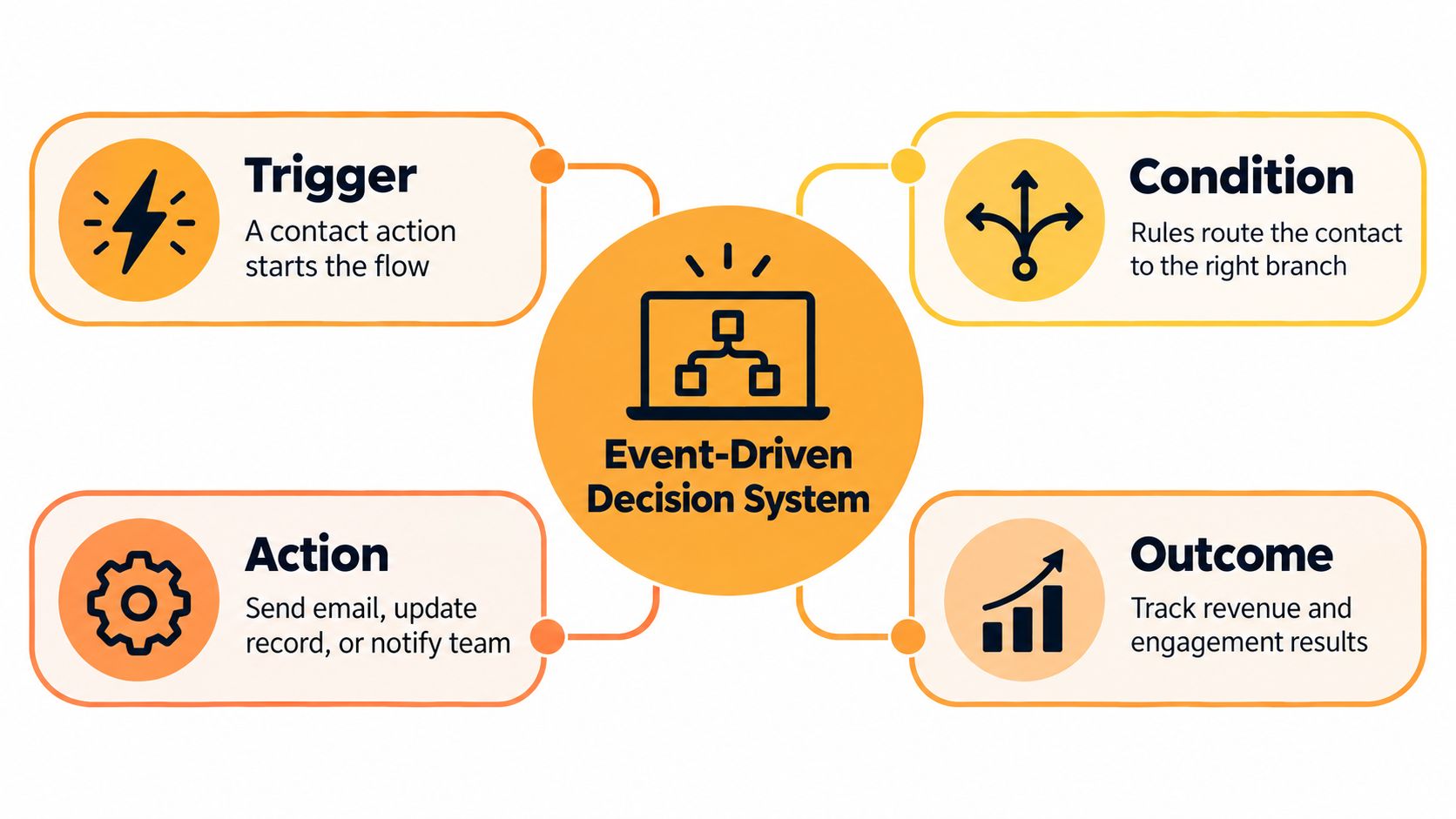
If a branch can’t name its trigger, its condition, and the revenue outcome it owns, it’s a broadcast wearing an automation label.
Wire up subscribe, product view, cart create, order, and inactivity first. Those five events cover acquisition, intent, near-purchase, purchase, and decay. Everything else is refinement. And judge the system the way you’d judge any retention infrastructure, against conversion rate, repeat purchase, CAC payback, and LTV, not against how much manual sending it saved you.
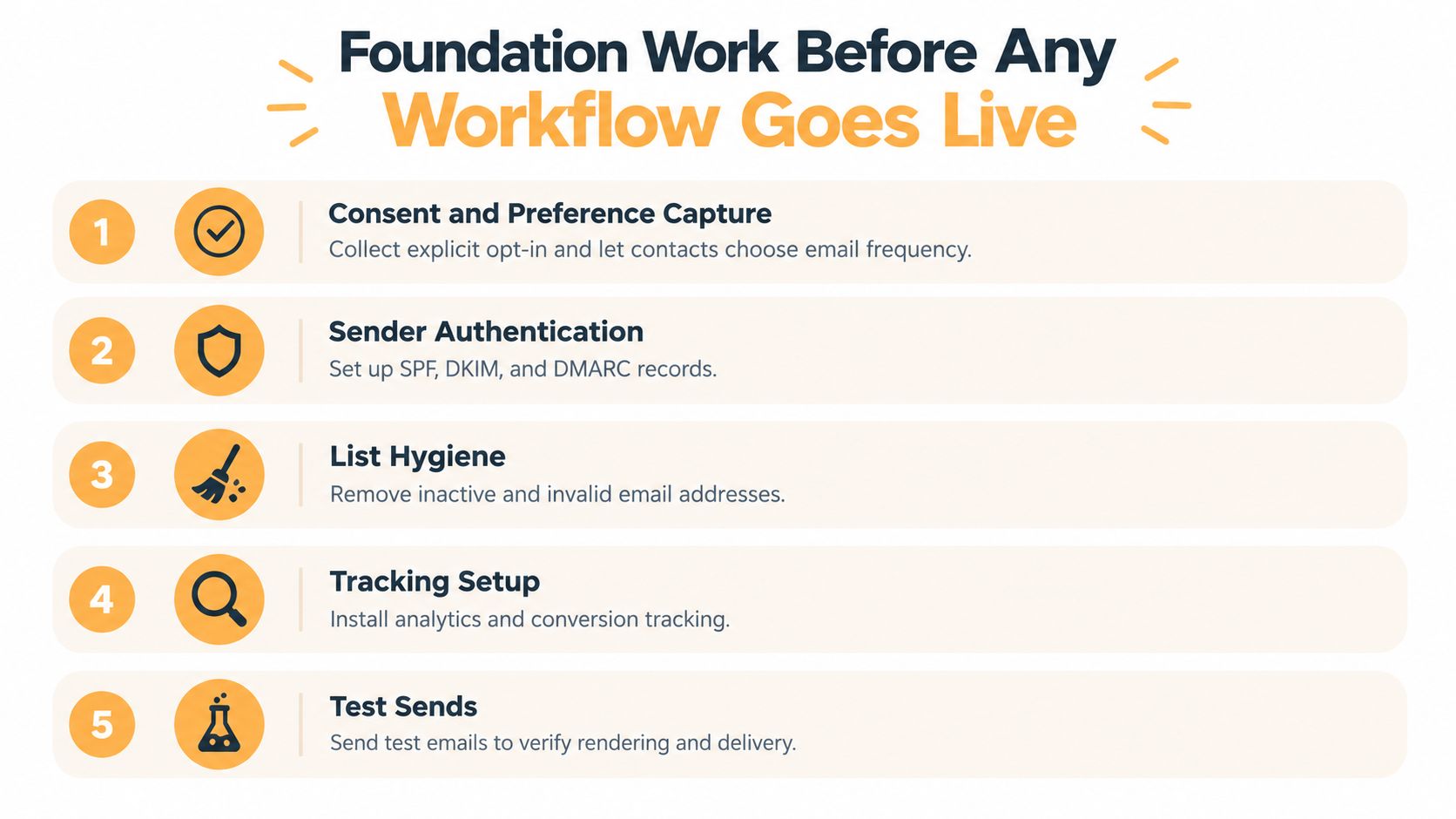
Foundation Work Before Any Workflow Goes Live
Clever branching can’t rescue mail that never reaches the inbox. Most programs I’ve audited didn’t have a copy problem. They had unauthenticated sending, stale lists, and no suppression discipline, and then teams kept rewriting subject lines to fix a placement problem.
Authenticate Before You Optimize
Start with the sending domain. Publish SPF and DKIM, deploy DMARC with reporting, and validate alignment between the visible From domain and the authenticated domain. Benchmark synthesis estimates roughly 95 to 98% inbox placement for fully authenticated domains versus below 85% for unauthenticated sending, with results varying by mailbox provider and reputation. That gap is bigger than any subject line test you’ll ever run.
Then warm volume gradually. Watch hard bounces, spam complaints, and provider-specific placement while you ramp. Sudden spikes, purchased lists, misleading subject lines, and image-only emails damage reputation and accessibility even when a single send looks fine on the surface.
If you’re inheriting a program, look for the tells. Complaints climbing while volume stays flat, placement collapsing at one provider but not others, and filtering that starts right after a domain or platform change all point to authentication or reputation, not creative.
Consent, Suppression, and Event Plumbing
Authentication gets you eligible for the inbox. Consent and hygiene keep you there. Capture explicit opt-in, store the source and timestamp, and give people a preference center so frequency becomes their choice instead of your guess. Exclude unsubscribed, hard-bounced, and complaint addresses in real time, across every workflow, not just campaigns.
Segment the base you’ll mail by consent status, engagement recency, lifecycle stage, geography, and purchase behavior. Route inactive contacts into re-engagement with a defined exit instead of mailing the full database on repeat and letting disengagement drag down the domain for everyone.
Last, verify the plumbing. Every downstream branch depends on a reliable signal from your platform of record, whether that’s Shopify, WooCommerce, or your CRM. Test that subscribe, view, cart, and order events arrive with the right contact identity and timestamps, send test messages to check rendering and links, and confirm conversion tracking reconciles before any branch goes live. A workflow triggered by a broken event doesn’t underperform. It misfires confidently, at scale, while you’re not watching.
Segmenting by Behavior Instead of Demographics
Demographics tell you who someone is. Behavior tells you what she’s about to do, and that’s the only version your workflow can act on in time to matter. Age and job title don’t tell you whether to send now, wait, or stay quiet. A second product view, a recent purchase, or a long stretch of silence does.
The performance gap for acting on behavior is not subtle. One study of behaviorally segmented campaigns reported 42.5% average open rate versus 28.7% for non-segmented campaigns, 18.3% click-through versus 9.5%, and 7.8% conversion versus 3.4%. The same study reports the conversion difference as statistically significant, with t(58) = 9.23 and p < 0.001 in the verified summary of that work. Don’t treat those figures as universal benchmarks, since list quality, offer, deliverability, industry, and attribution all move results. Treat them as evidence for the underlying principle, which is that relevant routing beats sending identical content to everyone.
Routing Rules You Can Actually Run
Start with a small set of segments that map to distinct messages. If two segments would receive the same email, they’re one segment with extra maintenance.
| Behavior Signal | Segment | Workflow Branch | Exit Condition |
|---|---|---|---|
| Repeated product or pricing views | High intent evaluator | Product follow-up or consultation prompt | Purchase, booking, or frequency cap reached |
| Recent order placed | New customer | Post-purchase education, suppressed from acquisition offers | Onboarding complete or repeat purchase |
| Clicks without purchase | Engaged non-buyer | Objection handling and proof content | Purchase or engagement drops off |
| No engagement over your inactivity window | Cooling contact | Re-engagement with preference option | Reactivation, unsubscribe, or suppression |
That high-intent evaluator is where understanding how buyers move from interest to action pays off, because a professional services prospect viewing pricing needs a consultation path, while a DTC shopper viewing the same product needs reviews and a cart link.
Practical rule: Every segment needs an exit condition written down before launch, or contacts get stuck receiving messages written for a version of them that no longer exists.
Resist the urge to slice until each segment is too small to measure. You’ll learn more, and earn more, from a handful of behavior segments with clean control comparisons than from dozens of micro-segments nobody can maintain. Each segment gets a defined audience, trigger, message, and outcome tied to conversion or revenue. That’s what turns segmentation from a targeting exercise into a measurement system.
Building a Welcome Series That Sets the Tone
The welcome series is the cleanest place to learn branch design because intent is fresh, the trigger is unambiguous, and decay starts immediately. Someone just raised her hand. What you send first teaches her whether opening your mail is worth it.
Send the first message right away, and make it do its job. Confirm what she signed up for, deliver whatever you promised at capture, and give her one clear next step. Use the signup source as your personalization signal. A subscriber from a sizing guide, a quiz, and a checkout opt-in arrived with different intent, and your first email should reflect that instead of opening with a generic brand essay she didn’t ask for.
From there, pace value before pressure. A workable arc is confirmation and delivery first, then useful content tied to her signup reason, then proof in the form of reviews, results, or a quick win she can act on, then a direct conversion prompt while engagement is still warm. In a B2B or professional services context that prompt is a consultation or a relevant resource conversation. In DTC it’s a first purchase, ideally of the product category she viewed.
Where Welcome Series Quietly Lose People
Three mistakes show up constantly. The first is the over-long intro, where the brand story crowds out the promised value and the reader leaves. The second is premature discounting, training new subscribers to wait for offers before they’ve learned why the product is worth full price. The third is skipping preference capture, so you never learn how often she wants to hear from you or about what, and every later workflow inherits that blindness.
Add branching where behavior earns it. If she clicks product content, move her toward purchase support. If she clicks educational content, keep teaching. If she buys mid-series, exit her into post-purchase immediately. Nothing undermines trust like a first-order discount arriving after she’s already paid full price.
Measure the series like an experiment, not a greeting. Hold out a small cell of new subscribers who meet the trigger but don’t receive the series, then compare first purchase rate, revenue per subscriber, unsubscribe rate, and time to first conversion over a defined window. Opens will look flattering in almost any welcome flow. The holdout tells you whether the series creates buyers or just accompanies people who would’ve bought anyway, and that distinction decides whether you extend the series, shorten it, or rebuild the first message.
Cart Abandonment as Your Highest-Leverage Workflow
For a Shopify or similar DTC store, abandoned cart is the workflow with the cleanest revenue case and the sloppiest average execution. The intent signal is unambiguous. She picked products, started checkout, and stopped. Your job is speed, restraint, and not stepping on your own other workflows.
The timing data makes speed essential. Benchmark data covering more than 143,000 automated flows reports a 50.5% average open rate, 6.25% click rate, 3.33% placed-order rate, and $3.65 revenue per recipient for abandoned cart flows. The same benchmark source reports 20.3% conversion when the message is sent within one hour versus 12.2% after 24 hours, which is why a next-day first reminder leaves money on the table.
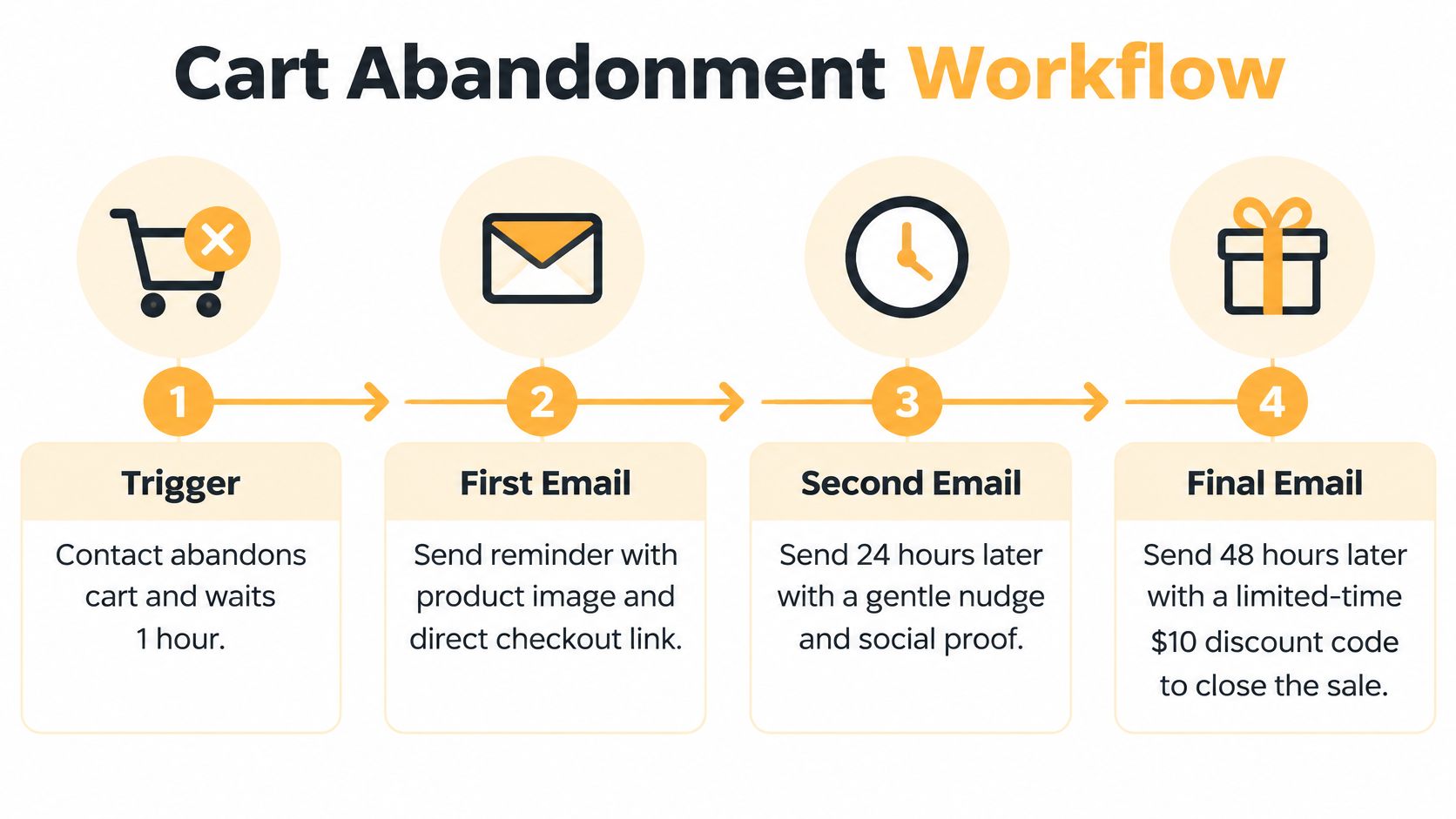
The visual sequence below shows the shape of the flow before you add branching logic to it.
The Operational Spec
Trigger on cart created with no order recorded. Suppress immediately if checkout completes, checked again before every send, not just at enrollment. Send the first reminder within one hour with the actual products shown and a deep link back to the prefilled cart. Making her rebuild the cart is an unforced error.
Branch the follow-up by cart value, product margin, customer status, and prior purchases. A high-value first-time cart can justify stronger proof and help content. A repeat customer with a small replenishment cart mostly needs the link. Send a second reminder around the next day that handles objections such as shipping, returns, and fit. Reserve any incentive for a controlled final message, and keep a no-discount control cell running so you learn whether the discount creates orders or just subsidizes people who were coming back anyway.
Guard the overlaps hard. Browse abandonment, cart abandonment, and post-purchase flows firing on the same person in the same window is how good programs train people to ignore them. Use frequency caps, universal purchase suppression, and UTM and order ID reconciliation, and give cart priority over browse when both qualify. This is core plumbing inside any serious email marketing for ecommerce program, and it’s where agencies like Excellorix, which builds Klaviyo flows including welcome, cart recovery, post-purchase, and win-back sequences for ecommerce clients, tend to start an audit.
Judge the flow on incremental placed orders and revenue per recipient against a holdout, because last-click credit will flatter any email sent an hour before a purchase that was already likely.
Measuring Workflows by Revenue, Not Opens
Open rate stopped being ground truth when Apple Mail Privacy Protection started prefetching mail, and automated security scans plus AI inbox summaries push it further from reality every year. You can watch opens as a soft directional signal if you want. The moment you optimize branches against them, you’re tuning your program to please machines that scan mail, not people who buy.
Attribution is the harder problem hiding underneath. A comparative attribution study reports that last-click models over-credit triggered emails near conversion by approximately 1.7 times and under-credit earlier nurture emails at roughly 0.4 times their estimated true contribution. Read that carefully. Your cart flow probably looks better than it is, and the nurture work that made the cart possible probably looks worse. Teams that don’t know this cut the early emails, keep the late ones, and then wonder why pipeline thins out.
Build the Holdout Into the Workflow
You don’t need a data team to measure incrementally. You need a control cell designed at build time, not bolted on after finance asks questions.
- Define the eligible audience: Everyone who meets the trigger and conditions for the branch.
- Split off a holdout: A portion of eligible contacts receives nothing from this workflow for the test window.
- Compare outcomes that matter: Conversion, revenue per recipient, contribution margin where you can get it, plus unsubscribe and complaint rates.
- Decide on lift, not level: Scale branches that beat the holdout, fix or kill branches that only match it.
That structure answers the only question worth asking about a triggered email. Did it cause revenue, or did it just arrive shortly before revenue and collect the credit? A simple view inside your marketing analytics dashboard that puts treatment and control side by side by workflow stage will change more decisions than any open rate report.
The best automation may not be the one with the highest attributed revenue. It may be the one that produces measurable lift without discounting purchases that would’ve happened anyway.
Report revenue per delivered email, click-to-conversion, list churn, and LTV by workflow stage as your primary set. Test one variable at a time, whether that’s subject line, send delay, offer, or creative, so you know what moved. And set pause triggers in advance. When complaints, unsubscribes, or hard bounces from a branch spike, that branch stops while you investigate, because reputation damage compounds across every other workflow sharing the domain.
Your 30-Day Rollout Plan and Common Guardrails
Sequence matters more than speed. A month is enough to launch a program that earns, if you resist building branch three before the foundation under branch one exists.
Week one is infrastructure. Authenticate the domain, confirm alignment, set up DMARC reporting, clean the list, and publish your suppression and consent rules. This is also where compliance stops being theoretical. A deliverability benchmark indicates that roughly 30% of senders remain partially non-compliant with at least one Gmail or Yahoo bulk-sender requirement two years after enforcement began, covering authentication, one-click unsubscribe, or spam-rate thresholds. Don’t be in that group when your first automated volume lands.
Week two is signals and segments. Verify subscribe, view, cart, and order events end to end, define your starter behavior segments, and write the exit condition for each one.
Week three is the two branches that pay first. Build the welcome series and the cart flow for ecommerce, or welcome plus high-intent follow-up for services, with purchase suppression and frequency caps in place from day one.
Week four is measurement. Turn on holdouts, build the revenue per recipient view, and set complaint and unsubscribe pause thresholds before you scale volume or add journeys.
Guardrails That Keep Programs Alive
- No overlapping journeys: Browse, cart, and post-purchase messages never compete for the same person in the same window.
- No disguised blasts: If everyone gets it regardless of behavior, it’s a campaign, so measure it like one.
- No untested incentives: Discounts earn their place against a no-discount control, or they don’t ship.
- No open-based decisions: Revenue, conversion, and churn decide what scales.
- No stuck segments: Every audience has a documented way out.
Audit any program you inherit against four confirmations. Authentication confirmed. Suppression confirmed. Measurement confirmed. Exit for every segment confirmed. Programs rarely die from one bad email. They degrade gradually through overlap, stale audiences, and flattering metrics, until the channel looks busy and contributes little. The guardrails above are how yours stays a revenue system instead of background noise.
If your current program can’t show incremental revenue by workflow, or your cart and welcome flows were built before your authentication and suppression rules were, that’s exactly the kind of rebuild Excellorix handles across email automation, ecommerce, and analytics. Visit Excellorix to talk through an audit of your triggers, branches, and measurement, and leave with a sequenced plan your team can ship.