Skip to content


Only 48% of mobile websites passed all three Core Web Vitals, according to the 2024 HTTP Archive Web Almanac, using real-user Chrome UX Report data. Website performance is a practical buying decision, not only a developer’s scorecard.
Good website speed optimization services improve what visitors can see and do, then measure whether those changes help the business. Each script and template works like a line on a profit audit: the extra weight has to pay for itself. A heavier feature can still raise conversion and order value, so deleting JavaScript is not the goal by itself. Ask what the file costs the user, and what it contributes to profit.
Table of Contents
- What a Speed Optimization Service Covers
- Core Web Vitals Targets a Service Must Hit
- Why Most Sites Still Fail All Three
- How Tenths of a Second Move Revenue
- When a Heavier Script Still Earns Its Place
- What Changes on Real Page Templates
- What Engagement Looks Like and What It Costs
- Start With a Ranked Technical Audit
What a Speed Optimization Service Covers
A website speed optimization service combines diagnosis and engineering to show useful content sooner, keep the layout stable, and make taps respond promptly. It should connect those improvements to paid clicks, organic visits, and completed orders or leads, rather than stop at a faster test result.
Say a shopper clicks an ad for a jacket. The landing page appears, but the size selector freezes while marketing tools finish loading. A wide shop entrance doesn’t help much if the counter stops working once the customer gets inside.
The commercial stakes aren’t new: in Google and SOASTA’s 2017 mobile analysis, which examined more than 900,000 landing pages across 126 countries under emulated mobile and representative 3G conditions, 53% of mobile visitors were predicted to leave when loading exceeded 3 seconds. That’s a historical benchmark, not a forecast for your store, but it explains why speed belongs in acquisition planning.
Diagnose the delay before choosing the fix
The work begins by separating server delays, rendering problems, slow interactions, and unexpected movement. Chrome DevTools can reveal a blocking script, while PageSpeed Insights can help distinguish a controlled lab test from available real-user measurements.
The investigation should cover the experience people use, not merely an empty browser on a developer’s computer.
A useful scope connects technical work to the people responsible for results:
- Media buyers: Landing pages should let visitors reach the offer without waiting for unrelated tools.
- SEO teams: Shared templates need fixes that hold across real visits.
- Store and service owners: Product controls, carts, and forms must remain usable while background features load.
The deliverable is therefore more than compressed files. It’s a documented set of changes, functional checks, performance measurements, and business outcomes to monitor.
Core Web Vitals Targets a Service Must Hit
Field performance is the hiring standard, not a polished screenshot from an office laptop. Google’s Core Web Vitals guidance sets good thresholds at the 75th percentile of field experience, with the metric-specific targets shown below.
Field targets a speed service should manage
| Metric | Good at 75th percentile | What the user feels | Main engineering work |
|---|---|---|---|
| Largest Contentful Paint | 2.5 seconds or less | Main content appears | Faster server response, critical rendering path, sized hero image, fewer render-blocking resources |
| Interaction to Next Paint | 200 milliseconds or less | Taps and clicks get a response | Shorter JavaScript tasks, fewer third-party scripts, deferred or split code |
| Cumulative Layout Shift | 0.1 or less | The page does not jump | Reserved space for images, ads, embeds, and injected interface elements |
These aren’t interchangeable measurements. A page can display its main image promptly yet hesitate when someone opens a menu.
Loading and responsiveness require different work
Largest Contentful Paint, or LCP, concerns the appearance of the main content. A developer should identify the actual LCP element rather than assume it’s always the hero photograph.
If the browser waits for the initial document, investigate server response, application processing, and caching. If the document arrives promptly but the image appears late, inspect resource discovery, image sizing, compression, and competing downloads. Don’t lazy-load an image that visitors need immediately.
Interaction to Next Paint, or INP, concerns the response to input. Downloading JavaScript and executing it are different costs: a cached script can still occupy the browser when a shopper tries to select a variant.
Break long tasks into smaller pieces, load nonessential functionality later, and inspect event handlers attached to important controls. Deferring a file won’t solve an interaction that still triggers expensive work.
Acceptance rule: A better lab result is evidence of progress, not proof that real customers received the improvement.
Stability needs space reserved in advance
Cumulative Layout Shift, or CLS, concerns unexpected movement. Give images dimensions, reserve containers for embeds, and prevent asynchronously loaded interface elements from pushing existing content aside.
A review widget shouldn’t move the purchase button just as someone reaches for it. A cookie interface shouldn’t displace the headline after the visitor starts reading.
Validation should combine controlled diagnostics with real-user evidence:
- PageSpeed Insights: Check whether the displayed field assessment represents the tested URL or a broader origin.
- Search Console: Review affected URL groups and identify shared template problems.
- Real-user monitoring: Inspect device, geography, and journey differences when aggregate results hide friction.
Report homepages, product or service pages, landing pages, and transaction or form flows separately. Where a template lacks enough field observations, state that limitation and use instrumented measurements alongside lab diagnostics rather than claiming a confirmed pass.
Before approving a scope, require the affected metric, the target templates, and the field dataset that will validate the work.
Why Most Sites Still Fail All Three
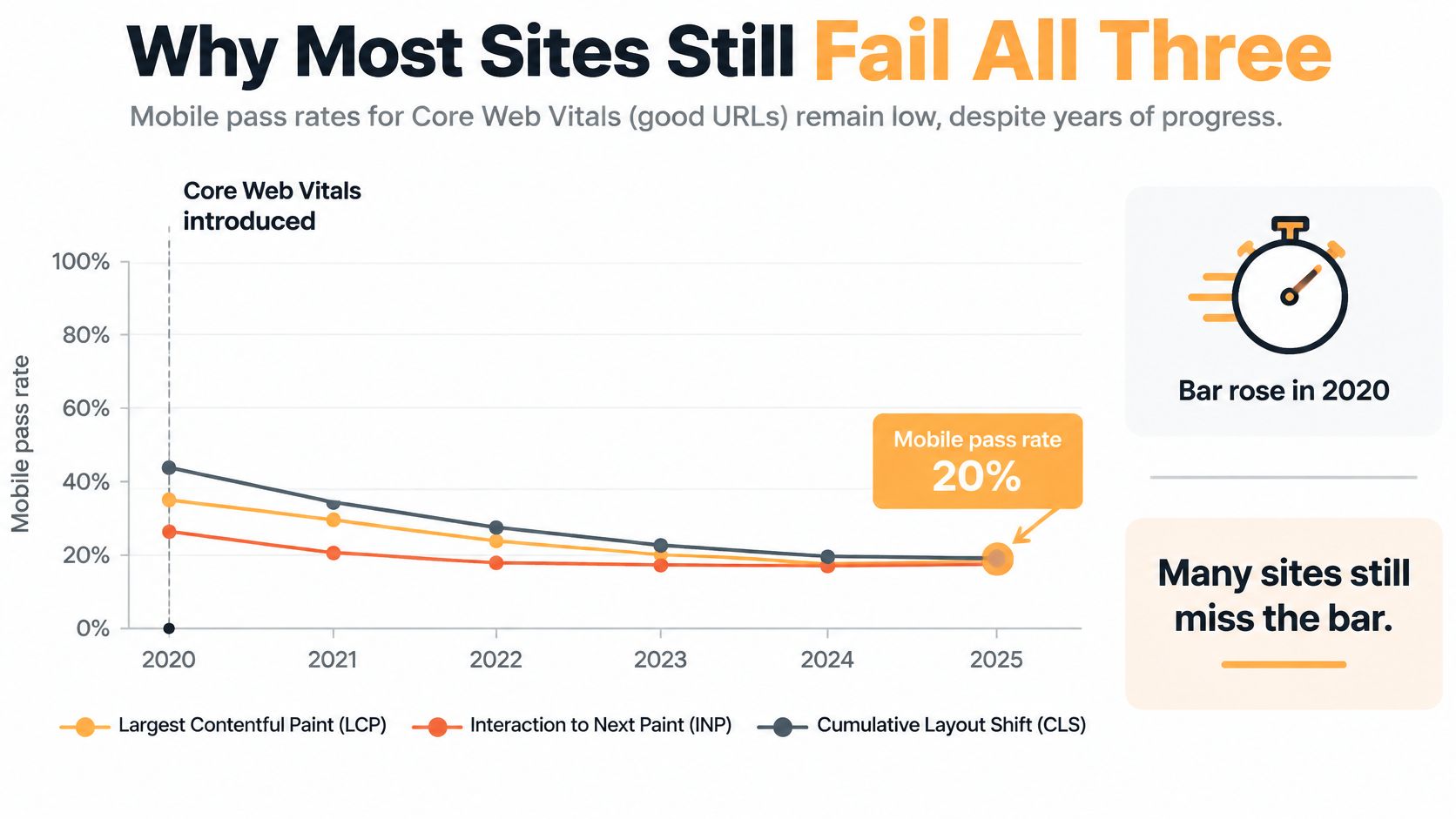
Clearing one metric is easier than keeping loading, responsiveness, and stability acceptable on the same visit. The HTTP Archive’s Web Almanac reports 48% passing all three on mobile in 2025, compared with 59% achieving good LCP, 74% good INP, and 79% good CLS. Historical and backend measures are in the table below.
Core Web Vitals pass rates on mobile
| Measure | Mobile share |
|---|---|
| All three metrics passed, 2020 | 20% |
| All three metrics passed, 2021 | 29% |
| All three metrics passed, 2022 | 39% |
| All three metrics passed, 2025 | 48% |
| Good LCP, 2024 | 59% |
| Good INP, 2024 | 74% |
| Good CLS, 2024 | 79% |
| Good Time to First Byte, 2024 | 42% |
Mobile pass rates rose from 20% in 2020 to 48% in 2025. The climb is real, and a majority of mobile sites still miss at least one of the three.
A quick first impression can hide a broken journey
A product collection can show its photographs quickly, then stall when a visitor taps a filter while the browser rebuilds the grid and runs unrelated scripts. On another template, a late review component shifts the purchase controls. “The site loads quickly” does not describe either loss.
Treat each script and template as a profit check, not as weight to delete on sight. A heavier filter can still earn its place if shoppers use it to reach a better-matched, higher-value product. It fails when the tap freezes and they leave. A review block can support the order and still be a poor trade if it moves the buy control at the moment of the click.
Customers meet these failures together. They do not sort a hosting delay from a theme problem or an app problem before they decide whether to continue.
The server still needs an investigation
Time to First Byte is the wait before the browser receives the start of the response. A slow start can come from application processing, database queries, redirects, or a caching setup that does not match the template. Compressing images will not speed an application that is slow to produce the document. Changing hosts will not, by itself, fix an expensive query or a poorly configured integration.
On template-heavy sites, separate the failures:
- Shared failures: Problems inherited from the theme, navigation, or global tag configuration.
- Template failures: Problems concentrated in product galleries, service layouts, or booking forms.
- Conditional failures: Problems that appear after consent, personalization, login, or interaction.
A professional-services landing page can behave differently from its resource library. Healthcare scheduling pages and ecommerce catalogs need their own checks, even on one domain. Compare an audit’s coverage with that spread. One before-and-after screenshot cannot show that the full experience was investigated.
How Tenths of a Second Move Revenue
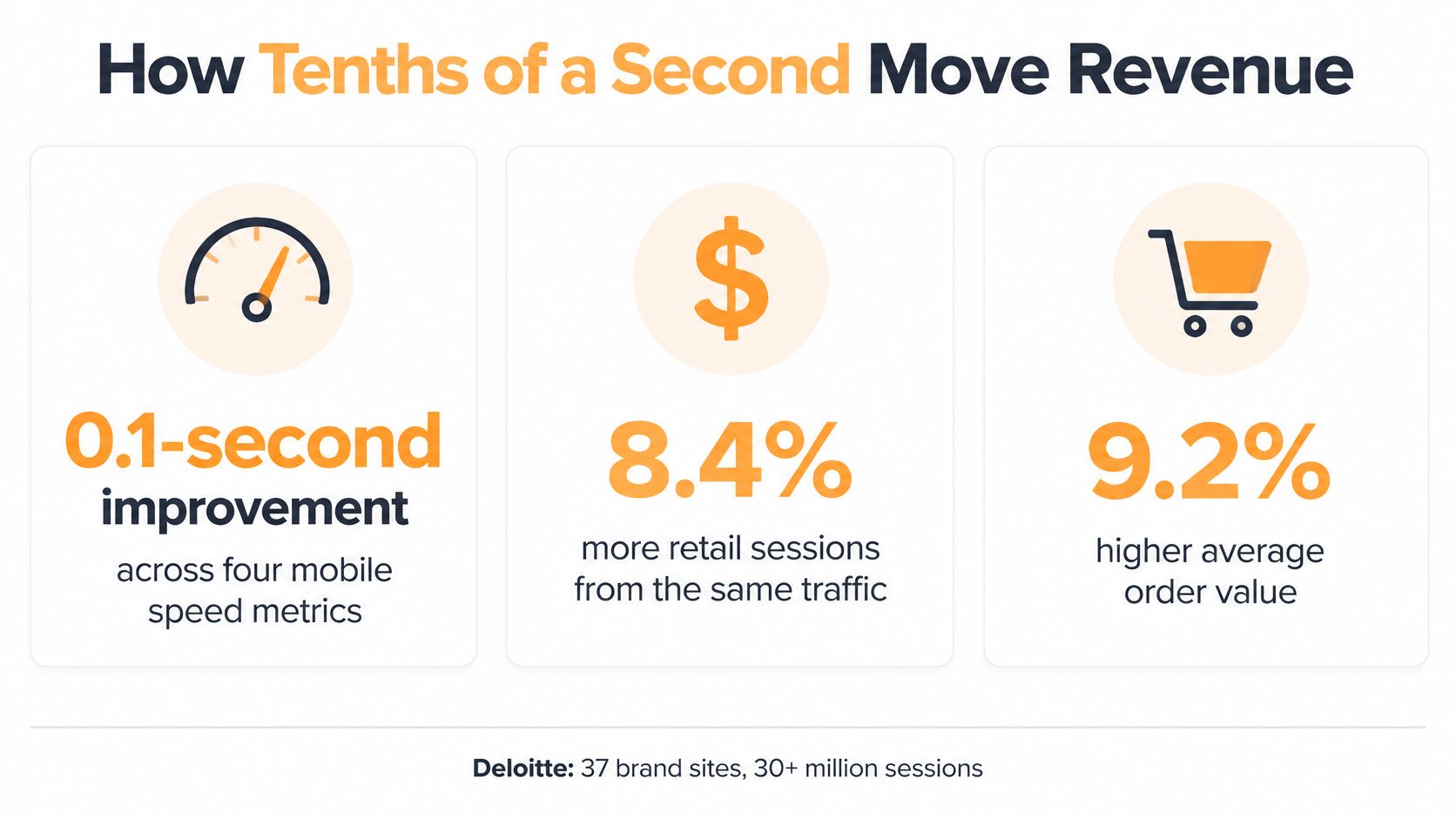
A tenth of a second looks trivial on a stopwatch. It still moves money. A 0.1-second improvement across four mobile speed metrics was associated with 8.4% higher retail conversions and 9.2% higher retail average order value in Deloitte’s study of 37 brand sites and more than 30 million sessions. Those results are observational benchmarks from that set of brand sites. Use them to justify investigating friction. Leave them out of a revenue forecast for a different business.
Treat the speed project as a profit audit of each script and each template. The goal is not to delete JavaScript until the page is as light as possible. Some heavier features still raise conversion rate and order value because they help a shopper choose, configure, or trust the purchase. A lighter template that buries the price or stalls a filter can cost more than the bytes it saved.
The illustration summarizes the relationship between that 0.1-second mobile improvement and higher retail conversions along with average order value.
Measure the actions that lead to payment
Delay shows up like a slow checkout line: at the menu, at the counter, and at the card reader. Arrival time alone misses most of it. Instrument the points where a visitor decides or submits information, and record what responsive means at each one.
| Step | What to watch |
|---|---|
| First view | The offer is readable before optional media finishes. |
| Product filtering | The selected state appears promptly, with clear loading feedback. |
| Add to cart | The interface confirms the action without encouraging duplicate taps. |
| Form completion | Visitors can enter details without validation scripts interrupting typing. |
| Payment or booking | Controls respond while the selected options stay intact. |
For a Shopify store, pair that measurement with Shopify conversion optimization. Merchandising, interface behavior, and technical delivery all sit on the same path to payment.
Set the baseline before any release. Record revenue, conversion rate, average order value, abandonment, and field performance, split by device and by the acquisition source that brought the visit.
Attribute improvement carefully
Prefer a controlled experiment when you can run one. If you cannot, compare equivalent segments and write down changes in promotions, inventory, traffic mix, and consent behavior.
A faster release that goes live during a sale does not prove speed produced the whole conversion jump. Missing purchase events can make a sound engineering change look like a commercial failure.
Measure what visitors complete, not just what the browser downloads.
Then check whether acquisition spending produced more completed purchases or qualified leads. Paid traffic makes the trade-off concrete: the business has already paid for the visit before a slow landing page interrupts it.
When a Heavier Script Still Earns Its Place
A heavier script works like a salesperson on the floor. The extra cost is worth paying only when the extra sales cover it. Speed work is a profit audit of each script and each template, not a race to strip JavaScript, because a larger feature can still raise conversion and order value.
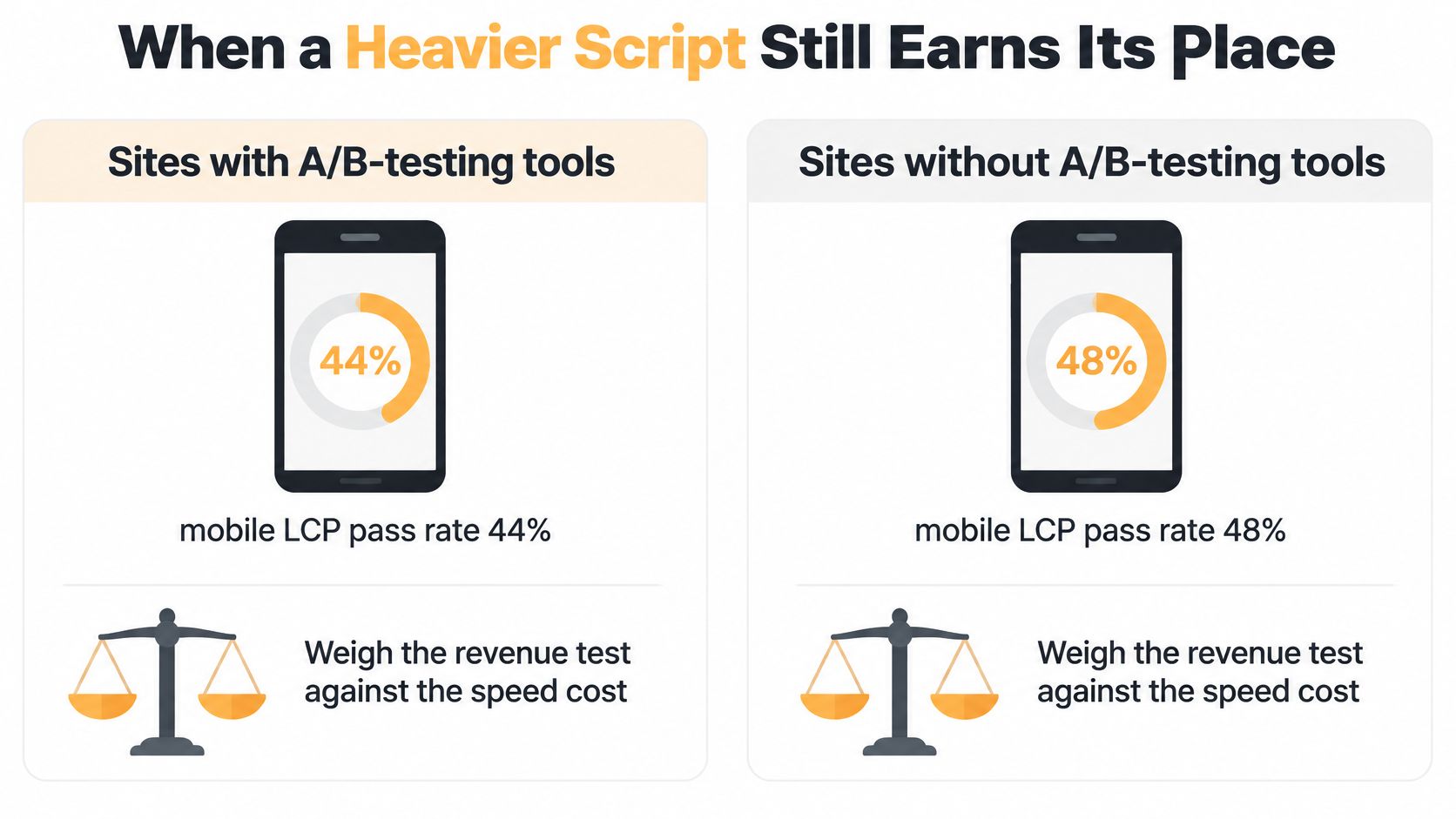
PageSpeed Matters’ independent performance studies found mobile LCP pass rates of 58.5% for sites using A/B-testing tools versus 68.7% without them, a 10.2-percentage-point gap; they also found ecommerce sites using recommendation engines passed all Core Web Vitals more often despite carrying roughly twice as much JavaScript. Those comparisons describe observed groups, not proof that installing or removing a tool causes the difference.
Script cost versus commercial contribution
| Feature | Observed speed pattern | Business question | Service verdict |
|---|---|---|---|
| A/B testing tool | Mobile LCP pass rate 58.5% with the tool versus 68.7% without, a 10.2-point gap | Does tested lift exceed the speed loss? | Keep only if deferred and the experiment pays for the delay |
| Product recommendation engine | Ecommerce sites using them passed all Core Web Vitals more often despite about twice the JavaScript | Does it raise conversion or order value without blocking first paint? | Keep when contribution is measured and loading is isolated |
| Unused chat, tag, or heatmap | Adds weight with no decision use | Is anyone acting on the data? | Remove or delay |
Evaluate contribution rather than file size alone
An experiment tool that finds a stronger offer can stay. The measured gain has to beat the performance cost, and the code has to protect the content people need first.
Deferral is not a single switch. Load the test too late and the original offer flashes before the variation, which spoils both the visit and the result. Check that sequence on the live template.
A recommendation engine is a different trade-off. If it lifts profitable basket value, isolate its loading and reserve its space. File size alone is a weak reason to cut it.
An unused heatmap has nothing on the other side of the scale. Nobody reviews the recordings, so there is no commercial return to set against the weight.
Build a script-level profit audit
List each major script with its owner, purpose, loading trigger, affected templates, and dependencies. Pair field observations, such as Chrome UX Report, with analytics and experiment results, then judge the extra contribution that script adds.
Subscription cost and build time belong in the same estimate. The output is a verdict per script.
- Keep: Evidence supports the feature’s contribution, and implementation protects essential interactions.
- Defer: The feature is useful later in the journey or only after a relevant action.
- Remove: It duplicates another tool, lacks an owner, or has no defensible use.
A heavier site can outperform a lighter one when its features earn revenue and the loading is controlled.
What Changes on Real Page Templates
A shopper arriving at a homepage needs a readable offer, not a download of every asset the store owns. The developer sizes and compresses the hero, prioritizes the image that appears first, and prevents promotional overlays from displacing the headline.
On a product page, the priorities change. Gallery images need reserved dimensions and appropriate formats, variant selectors need responsive handlers, and review or inventory integrations shouldn’t hold the offer hostage.
Match the fix to the visitor’s task
A campaign landing page should display its form without waiting for every analytics tag. Its headline should also match the ad, because technical speed doesn’t compensate for an offer that feels unrelated to the click.
Checkout and lead-generation flows require functional testing beyond appearance. Address fields, payment options, scheduling controls, and error messages need to remain usable during background requests.
| Template | Representative fix | Functional check |
|---|---|---|
| Homepage | Prioritize the visible hero and stabilize overlays | Navigation and consent controls still work |
| Product or service page | Isolate supporting widgets and improve selectors | Options, pricing, and availability remain correct |
| Campaign landing page | Separate form delivery from optional tags | Leads submit and tracking remains valid |
| Checkout or multistep form | Reduce work around critical inputs | Validation, payment, and progression succeed |
Shopify apps, WooCommerce extensions, and WordPress plugins can introduce code across pages where their features aren’t needed. Custom sites can accumulate the same problem through shared bundles and integrations.
For WordPress, a site speed improvement plan should examine caching, image delivery, database work, and plugin behavior together. Disabling a plugin without checking dependent forms or page components can create a faster but broken website.
Keep improvements through release
At Excellorix, our website builds are designed for SEO, conversions, speed, and long-term scalability. Our core services span website design and development, SEO, PPC management, conversion rate optimization, and ecommerce solutions, so these decisions don’t need to be separated from acquisition planning.
Our third process step, Launch and optimize, involves testing, measuring, and adjusting elements once the site is live. That supports a release rhythm of finding affected templates, building fixes, validating behavior, and checking the live outcome.
An industrial or healthcare site may need a different emphasis. Heavy downloadable PDFs and gated enquiry forms can deserve attention before decorative imagery, particularly when they interrupt the visitor’s main task.
After the initial release, request these acceptance materials:
- Template evidence: Field measurements where available, plus clearly identified diagnostic tests.
- Change record: Scripts kept, delayed, replaced, or removed, with reasons.
- Commercial measure: The conversion action expected to improve and the method for evaluating it.
What Engagement Looks Like and What It Costs
Speed work prices each script and template the way a store checks which fixtures earn their floor space. A heavier booking widget or product gallery can stay when it raises conversion or order value. Stripping JavaScript only to lighten the page can remove the feature that pays for the visit.
Excellorix offers one-time projects, suited to websites, audits, and specific campaigns, and ongoing monthly marketing support, suited to ongoing growth and execution. The shapes below specify scope. They are not published speed packages with a fixed fee.
| Engagement shape | Best fit | Handover to specify |
|---|---|---|
| One-time project | A defined set of affected templates | Fix log by template and validation results |
| Ranked audit | Unclear causes or competing priorities | Prioritized leak list, baseline, and assigned owners |
| Campaign sprint | Landing pages supporting a live media push | Before-and-after campaign report |
| Monthly support | Continuing template and script changes | Field-data review and release retests |
Fees depend on the platform, template count, and scope. A free audit is the first step.
A Shopify theme adjustment is a smaller job than tracing a custom application’s backend or untangling WooCommerce checkout dependencies. Access limits stretch the same template count. Keep a heavier script when it lifts the commercial action, and question a light tracker that delays the first tap. Weight is a poor proxy for profit.
A proposal should separate diagnosis from implementation. It should also say whether hosting changes, app replacement, tracking repairs, and functional regression testing are included.
Scope check: Compare included templates, engineering work, and validation, not simply the headline fee.
Before signing, name the deliverables and the retest schedule. Name who approves changes, who can deploy them, and what happens if an essential integration blocks the proposed approach.
For a business already online, the free growth plan includes a technical audit and a ranked view of where the funnel is leaking revenue. That ranking puts paid work on the leaks that cost orders, ahead of cleanup that barely changes what visitors buy.
Start With a Ranked Technical Audit
For an existing website, start with a ranked technical audit, not a generic speed grade. The useful question is which technical obstacle prevents visitors from completing a valuable action, and what evidence supports fixing it first.
A technical SEO audit checklist can help organize the investigation, but the output needs priorities. A long list of warnings doesn’t tell a small team where to spend its engineering budget.
Reject shallow evidence and fragmented ownership
Be cautious about a plugin installation sold as complete optimization. Plugins can help implement particular changes, but they don’t replace diagnosis, interaction testing, or commercial measurement.
Also reject a lab screenshot presented without a percentile-based real-user assessment or an honest explanation of missing field coverage.
- Accountability: Our strategy, ads, SEO, design, and CRO work sit under one roof, reducing handoffs between disconnected vendors.
- Starting point: Each of our core disciplines offers a free audit option.
- Decision: Agree on the initial metric and affected templates before approving a redesign or remediation scope.
DTC stores, professional-services firms, healthcare organizations, and industrial businesses often need technical and conversion problems addressed together. Keeping ownership clear helps prevent a later campaign or design change from undoing the improvement.
Use the post-release evidence as the acceptance test: template measurements, a script decision log, and a defined conversion outcome. Request the free audit, identify the failing templates, and agree on the first metric that should move.
Excellorix offers a free growth plan for businesses already online, including a technical audit and a ranked view of where the funnel is leaking revenue. Visit Excellorix to request your audit and identify which templates and scripts deserve attention before you commit to speed optimization work.