Skip to content


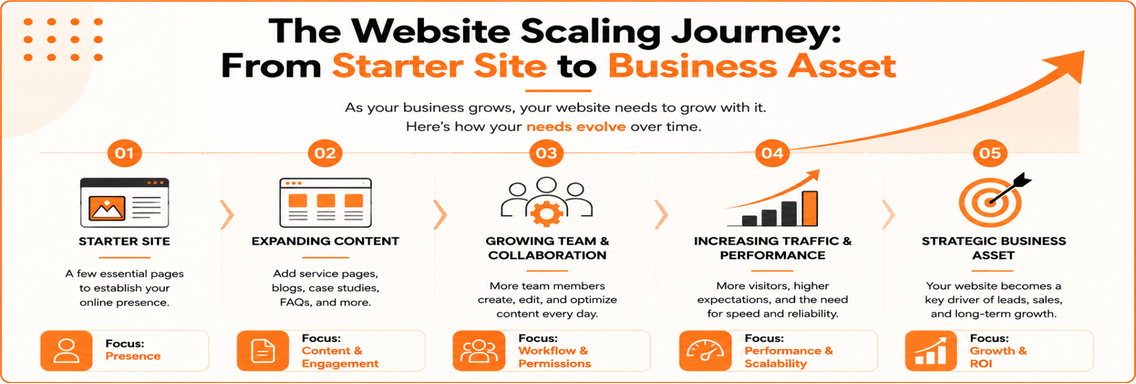
Your website might start with just a few pages. A homepage, an About page, a contact form, and maybe a couple of blog posts. A year or two later, things usually look very different. You’ve added service pages, case studies, blogs, landing pages, FAQs, and location pages. More people on your team are editing content. Traffic is increasing, and your website has become one of your most valuable business assets. This is when the WordPress vs Webflow debate becomes more than a design decision. It becomes a business decision. Both platforms can build attractive, high-performing websites. The difference is how well they support your business as it grows. Let’s look at where Webflow performs well and where WordPress still has the advantage.
How Webflow Handles Growing Content Libraries
One of Webflow’s biggest strengths is its Content Management System (CMS). Instead of designing every page from scratch, you create a template once and use it for similar content. Blog posts, case studies, team profiles, or portfolios can all follow the same layout while displaying different information. For many Webflow for business websites, this makes publishing much faster.
Imagine a digital marketing agency adding a new case study every month. Rather than rebuilding the page each time, the team simply enters the content, and Webflow automatically applies the existing design. This keeps every page looking consistent and reduces the time spent on routine updates. That said, the platform alone doesn’t determine whether your website can scale. A website with hundreds of well-organized pages will usually perform better than one with only a few dozen pages that lack structure. Clear navigation, logical categories, and strong internal linking are often more important than the CMS itself.
CMS Limitations as Websites Scale
As businesses expand, website management becomes more collaborative. Marketing creates content. Design uploads graphics. SEO teams optimize pages. Leadership reviews important updates before they go live. This raises practical questions. Who can publish content? Who should only edit drafts? Can different departments manage their own sections without affecting other parts of the website?
Webflow handles these needs well for many growing businesses, especially those with small or medium-sized marketing teams. However, companies with complex editorial workflows may eventually need more flexibility. Large publishers, universities, healthcare organizations, and enterprise businesses often require advanced approval processes, custom permissions, and more sophisticated relationships between different types of content. This is where WordPress website scalability continues to stand out. Because WordPress is open source, developers can customize almost every aspect of the publishing workflow. Instead of adjusting your business to fit the platform, the platform can be tailored to fit your business. For most companies, though, Webflow’s built-in CMS is more than capable of supporting day-to-day marketing and content management.
Ecommerce Growth Considerations
Selling products introduces a completely different set of challenges. Managing a store with twenty products is very different from managing one with two thousand. As ecommerce businesses grow, they often need advanced inventory management, subscriptions, wholesale pricing, customer accounts, product filtering, and integrations with shipping or warehouse systems. Webflow Ecommerce works well for brands that sell a focused range of products and want complete control over their website’s design. It provides a clean shopping experience while remaining easy to manage. But businesses planning significant ecommerce expansion should think beyond their current needs. If your roadmap includes multiple product categories, international stores, custom pricing, or extensive third-party integrations, WordPress combined with WooCommerce generally offers greater long-term flexibility. Choosing the right scalable website platform isn’t about selecting the platform with the longest feature list. It’s about choosing the one that supports your business goals over the next several years.
Performance Under Increased Traffic
Every business wants more visitors. The question is whether the website can continue performing well as traffic grows. One of Webflow’s biggest advantages is that hosting, security, and much of the technical optimization are handled for you. Businesses can focus on marketing instead of server management. WordPress takes a different approach. Performance depends heavily on hosting quality, website optimization, clean code, image compression, caching, and regular maintenance. A poorly maintained WordPress website can become slow. A properly optimized one can support millions of visitors. That’s why website speed shouldn’t be judged by the platform alone. In many cases, slow performance is caused by poor implementation rather than the CMS itself.
SEO Considerations for Larger Websites
One of the biggest myths in the WordPress vs Webflow discussion is that Google favors one platform over the other. It doesn’t.
Search engines care about valuable content, excellent user experience, technical performance, and a logical website structure. Both platforms can support these fundamentals. Webflow makes everyday SEO tasks simple. Marketing teams can easily update page titles, meta descriptions, redirects, image alt text, and URLs without relying on developers. WordPress provides greater flexibility through plugins and custom development, making it especially useful for larger websites with advanced SEO requirements. Ultimately, consistent publishing matters more than the CMS itself.
Businesses that regularly create helpful content and maintain a strong website structure almost always outperform competitors focused solely on choosing the “best” platform. That’s also why having an experienced SEO service supporting your website strategy can make a significant difference. A strong SEO strategy helps your website grow with your business by improving technical performance, content organization, and long-term search visibility.
Integrations and Extensibility
As your business grows, your website becomes more than a marketing tool. It starts connecting with CRMs, email platforms, booking software, analytics tools, payment gateways, and automation systems. For many businesses, these connections are essential. Webflow integrates well with popular platforms like HubSpot, Mailchimp, Zapier, Google Analytics, and many other marketing tools. For agencies, consultants, and service-based businesses, these integrations are usually enough to support daily operations. However, some businesses eventually require custom functionality.
You may need to connect an internal inventory system, build a customer portal, or integrate software unique to your business. In these situations, WordPress has a clear advantage because of its extensive plugin library and developer ecosystem. The strength of WordPress website scalability isn’t simply the number of plugins available. It’s the ability to build custom solutions when standard integrations are no longer enough. The right platform should support not only the tools you use today but also the systems your business may rely on in the future.
Team Collaboration and Workflows
Website management rarely stays a one-person job. Marketing publishes blogs. Sales requests landing pages. Design updates visuals. Developers handle technical improvements. Leadership reviews important pages before they’re published. Webflow makes collaboration easy for smaller teams. Its visual editor allows non-technical users to update content without worrying about breaking the website’s layout. That helps marketing teams work faster and publish content with confidence. WordPress, on the other hand, offers more advanced user roles and permission controls. Large organizations with multiple departments often benefit from this flexibility because different teams can manage content while following structured approval processes. Neither platform is better for every business. If your website is primarily managed by a marketing team, Webflow keeps things simple. If dozens of people contribute content across departments, WordPress often provides the control needed to manage growth efficiently.