Skip to content


Email automation is a rules-based messaging system that sends emails when a subscriber meets predefined triggers, such as a signup, purchase, or page visit. Automated emails account for just 2% of email sends yet generate 37% of email-generated sales, showing why automation is a conversion system, not merely a scheduling feature (industry reporting on email automation).
For a DTC founder, that distinction matters. A campaign asks, “Who should receive this message today?” An automated workflow asks, “What did this customer do, and what should happen next?” That shift lets your brand respond to intent, lifecycle milestones, and customer needs without requiring someone to export a list and press send every time.
What Email Automation Actually Means
Email automation uses workflow rules to deliver a message after a specific event occurs. The event might be a visitor subscribing to your list, a shopper viewing a product, a customer completing a purchase, or a subscriber becoming inactive. The platform evaluates that event against conditions you define, then performs an action, such as sending an email, waiting, updating a profile, or removing the person from another sequence.
The simplest way to understand it is to compare automation with a traditional campaign.
A campaign is a broadcast announcement. You choose an audience, create a message, schedule a send, and deliver broadly to everyone who qualifies at that moment. That approach works well for a product launch, seasonal promotion, or brand newsletter, but it treats subscribers as a group.
Automation works more like a store associate who notices customer behavior. If someone joins your list, they might receive an introduction. If they browse a product without buying, they might receive useful information about that product. If they purchase, they might receive usage guidance rather than another acquisition message.
” Practical rule: Build the message around the customer’s next decision, not your next internal marketing task.
The business value isn’t just convenience. A workflow can execute continuously across time zones and volume spikes, keeping timing and context consistent (Braze’s explanation of email automation). That makes automation a conversion architecture. It connects events, data, content, timing, and outcomes into a repeatable system.
This also explains why post-click experience matters. A relevant email can create interest, but the landing page, product detail page, checkout, and follow-up determine whether that interest becomes revenue. Your email workflows should therefore connect with the broader post-click marketing experience, rather than operate as an isolated channel.
By 2025, 58% of businesses used automation in email marketing, while 76% of email marketers used automation tools and 48% planned to add automation to their programs (2025 email marketing automation trends). The category has moved beyond basic autoresponders. It now supports lifecycle orchestration, segmentation, and increasingly intelligent decision-making.
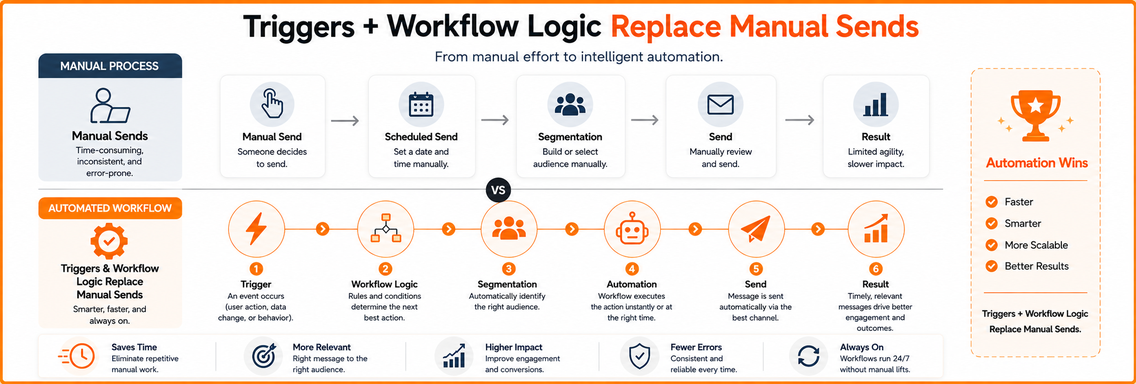
How Triggers and Workflow Logic Replace Manual Sends
A useful workflow has three moving parts: triggers, conditions, and actions. Think of them as the event, the decision rule, and the response.
Suppose a shopper adds $85 in products to a cart but leaves before checkout. The automation platform records the cart abandonment event. That event starts the workflow, but it doesn’t automatically mean every abandoned cart should receive the same message.
Triggers start the workflow
A trigger is the event that enrolls a subscriber. Common examples include:
- Signup: A visitor joins your email list.
- Browse activity: A subscriber views a product or category.
- Cart activity: A shopper adds products but doesn’t complete checkout.
- Purchase completion: An order is placed.
- Lifecycle timing: A specific date or period arrives.
The trigger should represent meaningful intent or a clear customer milestone. A page visit may indicate interest, while a completed purchase signals a change in relationship.
Conditions decide what happens next
Conditions filter the audience and create branches. For the $85 cart, you might check whether the customer is a first-time buyer, whether the cart value exceeds your chosen threshold, or whether the shopper has marketing consent.
A first-time visitor could receive reassurance about shipping and returns. A repeat buyer might receive a reminder focused on convenience. Someone who has already purchased shouldn’t continue receiving cart recovery messages for the same order.
Actions deliver the response
Actions are the workflow outputs. The system might wait, send an email, apply a discount code, update a customer profile, or add the subscriber to a retargeting audience. It can then evaluate the next behavior and choose another branch.
Without automation, a marketer would need to identify abandoned carts, export contacts, design a message, check eligibility, schedule the send, and repeat the process. Workflow logic performs those steps automatically while adapting to product category, customer history, and behavior.
That adaptability is the primary advantage. A batch campaign can personalize a name or segment, but a branching workflow can respond differently to a first purchase, a high-value repeat customer, a viewed product, or a subscriber who has ignored earlier messages.
The Most Common Email Automation Flow Types
Email flows map the customer lifecycle from subscription to repeat purchase. Each one has a distinct trigger, message job, and stopping rule. In Klaviyo, these commonly appear as Welcome Series, Abandoned Cart, Browse Abandonment, Post-Purchase, and Winback flows. Braze teams may build the same logic in Canvas with event triggers, delays, audience checks, and exit conditions.
| Flow Type | Trigger Event | Typical Platform Setup | Primary Outcome | Measurement |
|---|---|---|---|---|
| Welcome series | New subscriber signup | Klaviyo Welcome Series or a Braze Canvas entry event | Build trust and guide the first purchase | Compare revenue and engagement with your own baseline |
| Abandoned cart | Product added to cart without purchase | Klaviyo Abandoned Cart with purchase-based flow filters | Recover purchase intent | Measure completed purchases |
| Post-purchase nurture | Order completion | Klaviyo Post-Purchase flow or Braze purchase event Canvas | Improve product adoption and repeat purchase | Measure repeat orders, reviews, and support outcomes |
| Win-back campaign | Subscriber or customer becomes inactive | Klaviyo Winback or Braze re-engagement Canvas | Reconnect before disengagement becomes permanent | Measure reactivation and unsubscribes |
| Browse abandonment | Product or category viewed without cart activity | Klaviyo Browse Abandonment with viewed-product data | Convert high-intent interest | Measure direct and assisted purchases |
Welcome series
The welcome flow starts after signup. The first email sets expectations, explains the brand promise, and delivers the incentive or content that earned the subscription. Later emails can answer objections, introduce best-selling products, and help the subscriber choose a suitable starting point.
A DTC skincare brand might use the first message for its offer, the next for product selection, and another for usage guidance. The sequence should clarify why the product fits the subscriber, rather than repeat promotions. It is also a data-quality checkpoint: suppress invalid addresses, respect marketing consent, and stop the flow after a purchase when the message no longer fits.
Abandoned cart and browse abandonment
Cart abandonment signals stronger intent than a product view. A Klaviyo cart flow can show the selected items, explain shipping or returns, and address checkout friction. A discount may help, but making every reminder promotional can train shoppers to delay purchase.
Browse abandonment needs a different message because the shopper has not chosen a product. A viewed-product email can offer education, comparisons, or related categories. Braze Canvas can branch by viewed category or product event, while a purchase event should remove the customer from the reminder path.
Post-purchase nurture and win-back
Post-purchase messages help customers use, maintain, or reorder what they bought. A skincare brand might explain application order, while an apparel brand might provide care guidance. Review requests and complementary-product recommendations can follow when they match the product, consent, and customer expectations.
Win-back flows address declining engagement. They can present a relevant reason to return, ask whether the subscriber still wants updates, or offer preference controls. The workflow should also make unsubscribing easy. Continuing to mail inactive or unengaged addresses can weaken list quality and deliverability.
Together, these flows form a conversion architecture from first contact to loyalty. They require different timing, content, suppression rules, and data checks. The system creates value through triggers, but its results depend on accurate events, valid consent, and reliable customer profiles.
Why Automated Emails Outperform Campaign Sends
Automated messages often perform better because they arrive after a behavior that supplies context. A campaign might promote a product to a broad audience, while a triggered message reaches someone who has just signed up, browsed, purchased, or abandoned a cart.
One 2025 benchmark reported that automated emails generated $3.41 per email sent, compared with $0.155 for campaign emails. The same benchmark reported conversion rates of 1.49% for automated emails versus 0.08% for campaign emails (Omnisend’s email marketing benchmarks). These figures don’t guarantee a particular result for your store, but they illustrate the effect of relevance and timing.
The mechanism is straightforward:
- Intent is visible: A trigger reveals what the subscriber is doing.
- Timing is immediate: The message can arrive while the decision remains active.
- Content is narrower: The email addresses a specific question or obstacle.
- Execution compounds: Once built, a workflow can keep operating without a new production cycle for every recipient.
Automation creates a revenue floor
A campaign can create a short-term spike. A well-maintained lifecycle flow creates a baseline of activity across acquisition, conversion, and retention. That baseline gives your promotional calendar something to amplify instead of forcing every month’s revenue to depend on a new batch send.
The economics also explain why the channel attracts investment. Industry reporting places average automated email returns across different benchmarks between $5.44 and $36 to $42 for every dollar spent, with top performers reaching $8.71 or more per dollar (email automation benchmark reporting). These ranges aren’t interchangeable metrics, so treat them as directional evidence rather than a forecast.
| Metric | Automated Emails | Campaign Emails | Performance Gap |
|---|---|---|---|
| Revenue per email sent | $3.41 | $0.155 | Automated messages reported higher |
| Conversion rate | 1.49% | 0.08% | Automated messages reported higher |
The trade-off is operational. Campaigns offer flexibility and fast creative testing, while automation requires careful event tracking, segmentation, consent management, and ongoing review. Poorly configured automation can send irrelevant messages at scale, raise unsubscribe rates, and damage sender reputation.
Automation shouldn’t replace campaigns. It should provide the dependable lifecycle foundation that campaigns can strengthen.
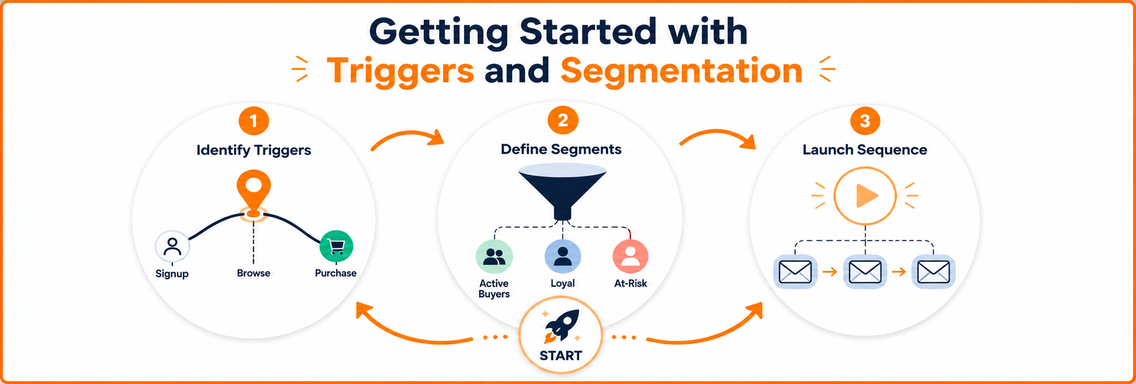
Getting Started with Triggers and Segmentation
You don’t need a complicated automation map to begin. Start with the customer events that happen frequently, carry clear intent, and connect directly to revenue or retention.
Start with the highest-value events
Map the lifecycle from signup through browse, cart, purchase, and post-purchase use. Then choose the first two workflows that solve the clearest commercial problems, often a welcome flow and an abandoned cart flow.
For each one, write down:
- The entry event: What exactly enrolls a subscriber?
- The desired next action: What should the customer do?
- The exit event: What removes the customer from the sequence?
- The measurement: Which completed action tells you the flow is working?
This prevents teams from building attractive sequences without defining their purpose.
Add segments only where they change the message
Segmentation should improve relevance, not create administrative complexity. In a cart flow, you might separate first-time shoppers from repeat buyers, or organize messaging by product category. A new customer may need trust signals, while an existing customer may need product education or a replenishment reminder.
Use your customer data carefully. A segment is only as reliable as the event and profile fields behind it. If purchase history is duplicated or product categories are inconsistent, the workflow will personalize the wrong message with confidence.
Control cadence and exits
A sequence needs delays, frequency limits, and suppression rules. The platform should stop cart recovery after purchase, prevent overlapping welcome and cart messages, and avoid sending several promotions to the same person in a short window.
Start with a narrow workflow, review conversions and unsubscribes, then expand. Before choosing an agency or platform, evaluate whether your team has the event tracking, segmentation, testing, and reporting needed to manage the system. A practical guide to choosing a Klaviyo email marketing agency can help clarify those implementation requirements.
The sequence is simple: identify the trigger, define the audience, build the response, and inspect the data before scaling enrollment.
Operational Risks That Undermine Automation Results
A broken suppression rule can send abandoned-cart emails to customers who just purchased, costing revenue and damaging sender reputation. Because automated flows run continuously, one logic error can affect every subscriber who meets the trigger.
Deliverability decay begins with inactive contacts, hard bounces, spam complaints, and weak list hygiene. Review engagement and remove addresses that should no longer receive active sends. In Klaviyo, suppression groups can exclude unengaged or disqualified profiles. Monitor bounce behavior rather than leaving every profile eligible indefinitely.
Consent drift creates a separate risk. Someone may consent to order updates without agreeing to promotional content. A post-purchase flow that adds marketing offers can violate expectations and applicable requirements, including GDPR and CCPA. In Braze, use consent fields to distinguish transactional permissions from promotional permissions, then keep subscription types and consent records visible in the data model.
” Operational rule: If you cannot explain why a subscriber entered a flow, which consent permits the message, and what event removes them, the workflow is not ready to scale.
Data degradation can make a technically correct flow commercially wrong. Broken tracking, duplicate profiles, stale product feeds, and inaccurate inventory signals may produce irrelevant recommendations or promote unavailable products. The result is avoidable complaints and unsubscribes.
Audit trigger accuracy, suppression logic, content, inventory connections, and consent records regularly. Treat each workflow as a monitored lifecycle system, not a scheduling tool left untouched after launch.
Where Email Automation Is Heading Next
Email automation is developing into a broader cross-channel orchestration layer. A lifecycle platform can coordinate email with SMS, push notifications, and in-app messages, then select the next touchpoint using engagement signals and channel preferences. The goal is a conversion architecture that responds to customer behavior, rather than a calendar of scheduled sends.
Email still supports detailed education, product guidance, receipts, and longer retention sequences. A customer might receive an email after signing up, a push notification after viewing a product, and an SMS only when a permitted time-sensitive update is appropriate. Unified journey rules reduce contradictory or repetitive messages across those channels.
AI-assisted workflows may help marketers adjust content and timing through predictive send-time selection, subject-line testing, and product recommendation blocks that respond to inventory changes. Brands exploring this approach can review AI-powered ecommerce funnels and automation for a related application. These features still rely on accurate events, valid inventory data, and clear consent. AI can optimize a sound workflow, but it cannot repair broken tracking or an unhealthy list.
Industry coverage points to intelligent inboxes, AI-driven workflows, privacy-first practices, and lifecycle orchestration rather than increasing email volume (Litmus trends in email marketing). Other coverage identifies sender reputation, authentication standards such as BIMI, privacy-focused data collection, and AI personalization as operational priorities (email marketing trend analysis).
For the next planning cycle:
- Audit existing flows: Review triggers, exits, consent, suppression, and deliverability signals.
- Unify customer data: Maintain one reliable source for identity, purchase history, preferences, and events.
- Map priority journeys: Trace paths from signup to purchase, purchase to retention, and inactivity to re-engagement.
- Add channels selectively: Expand only after email logic and data quality work reliably.
Excellorix helps brands audit flows, fix data quality issues, and design lifecycle journeys that convert. Visit Excellorix to start.