Skip to content


If you’ve ever launched a campaign and watched it sit in Google’s Learning Phase for days or weeks, you’re not alone. As a Google Ads management agency, we’ve seen businesses become frustrated when performance feels unpredictable. One day leads are coming in, the next day results disappear. Costs fluctuate, conversion rates change, and nothing seems stable. The common reaction is to start making changes. Budgets get adjusted, ads get rewritten, and bidding strategies get swapped. Unfortunately, those actions often keep campaigns stuck in learning mode even longer. The good news is that most Learning Phase issues have a clear cause. Once you identify what’s preventing Google from gathering quality data, improving Google Ads campaign optimization, increasing Google Ads lead generation, and strengthening Google Ads performance becomes much easier.
What Is the Google Ads Learning Phase?
The Learning Phase is the period when Google’s algorithm is gathering data and figuring out how to optimize your campaign. Think of it like training a new employee. They need time to understand your customers, goals, and processes before they can consistently perform well. Google works the same way. The platform analyzes user behavior, search intent, devices, locations, audiences, and conversion activity to determine who should see your ads and when. Some fluctuation during this period is normal. The problem starts when campaigns remain in learning mode for weeks without showing signs of improvement.
Why Campaigns Get Stuck in Learning Mode
1. Not Enough Conversion Data
Google learns through conversions. If your campaign generates only a few leads each month, the algorithm has limited information to work with. This is especially common in B2B industries and high-ticket services where sales cycles are longer. Instead of immediately increasing budget, look at ways to improve conversion tracking and consolidate campaign data.
2. Constant Budget Changes
One of the biggest mistakes advertisers make is reacting to daily performance. A campaign has one expensive day, so the budget gets reduced. Results improve, so the budget goes back up. A few days later, costs increase again and the cycle repeats. Google needs consistency. When budgets change too frequently, the algorithm spends more time adjusting than optimizing.
3. Frequent Bid Strategy Changes
Many advertisers switch between Maximize Clicks, Maximize Conversions, Target CPA, and Target ROAS too quickly. Each strategy uses different signals. When you constantly change bidding approaches, Google essentially has to start learning all over again. Patience often produces better results than constant experimentation.
4. Poor Conversion Tracking
If there is one issue that consistently hurts Google Ads campaign optimization, it’s inaccurate tracking. We’ve audited accounts where businesses thought campaigns were failing when the real problem was missing conversion data. Broken tags, duplicate conversions, CRM integration issues, and incorrectly configured events can all prevent Google from understanding what success looks like. Without accurate tracking, optimization becomes guesswork.
5. Overly Restrictive Targeting
Many advertisers believe tighter targeting automatically improves results. In reality, it can limit learning. We’ve seen campaigns restricted by narrow locations, excessive audience filters, and extensive keyword exclusions. The audience becomes so small that Google struggles to collect meaningful data. More control isn’t always better. Sometimes it simply limits opportunity.
6. Low Search Volume Keywords
Even the best campaign structure can’t create demand. If very few people are searching for your target keywords, Google has limited opportunities to gather data and optimize performance. Expanding keyword coverage or testing additional campaign types can often help generate stronger learning signals.
7. Excessive Negative Keywords
Negative keywords help eliminate irrelevant traffic.
The problem occurs when advertisers become overly aggressive. We’ve reviewed accounts where valuable searches were blocked simply because the exclusion list became too large. Negative keywords should protect your budget, not prevent growth.
8. Weak Landing Pages
Many advertisers focus entirely on ads while ignoring what happens after the click. If users arrive on a slow, confusing, or poorly designed page, conversions decline. When conversions decline, Google receives fewer signals to learn from. Strong landing pages don’t just improve conversion rates. They also support Google Ads campaign optimization by helping Google’s algorithm understand which visitors are taking meaningful action.
9. Too Many Campaign Changes at Once
This is more common than most people realize. Businesses update ad copy, budgets, keywords, landing pages, and targeting simultaneously. Then they try to figure out what caused performance changes. The answer is usually impossible to determine. Controlled testing works better. Make one meaningful change at a time and allow enough time for data collection.
10. Poor CRM and Offline Conversion Data
Google Ads relies heavily on first-party data. Many businesses treat every lead equally, but not all leads have the same value. When high-quality prospects and low-quality inquiries are reported the same way, Google receives mixed signals. Better CRM data improves Google Ads lead generation because the platform can focus on attracting prospects who are more likely to become customers.
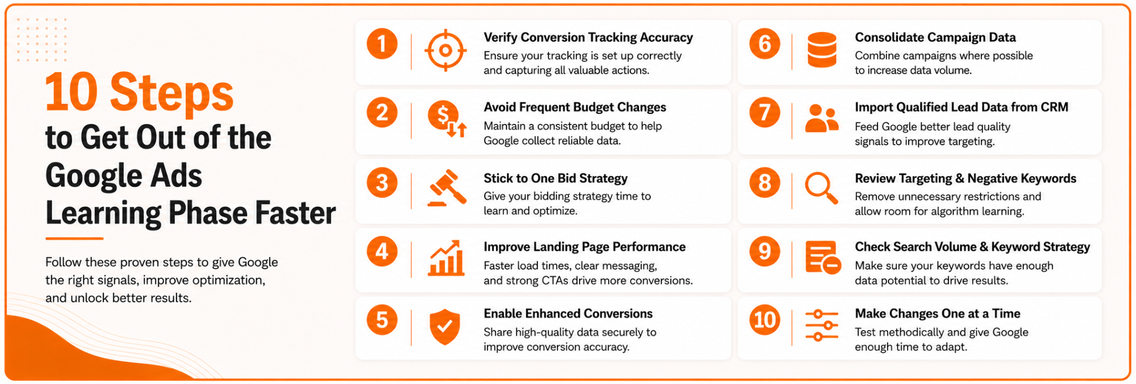
How to Get Out of the Learning Phase Faster
Most Learning Phase problems are fixable. Start with these steps:
- Verify conversion tracking accuracy
- Avoid frequent budget and bid strategy changes
- Improve landing page performance
- Enable Enhanced Conversions
- Consolidate campaign data where possible
- Import qualified lead data from your CRM
- Review targeting and negative keyword settings
The goal is simple: provide Google with better information so it can make better decisions.
Why Data Quality Matters Most
After reviewing hundreds of accounts, one pattern appears repeatedly. Most Learning Phase issues aren’t caused by Google itself. They’re caused by poor data. Whether it’s tracking problems, weak landing pages, restrictive targeting, or low-quality CRM data, they all affect the information Google receives. Businesses that achieve strong Google Ads performance focus on improving data quality before making major campaign changes. When the signals are accurate, Google’s machine learning system can do what it was designed to do.