Skip to content



On-page SEO optimization is improving the content and HTML elements of a single webpage so search engines understand its topic and visitors can tell whether it meets their need.
If adding keywords were enough, why would a page still attract the wrong visitors or fail to generate enquiries? The missing piece is often alignment: the search result promises something the page doesn’t clearly deliver.
A useful approach treats every edit as a test. You identify a problem, record current performance, make a focused change, and measure whether it helps the right visitors take a meaningful next step. You also organize answers so search and AI systems can retrieve individual passages without losing their meaning.
Table of Contents
- What On-Page SEO Optimization Covers
- How Search Engines Read a Page
- Writing Titles and Meta Descriptions That Earn Clicks
- Structuring Headings, Content and Internal Links
- Page Speed, Mobile Experience and Structured Data
- Common On-Page Mistakes and How to Avoid Them
- Run an On-Page Audit on Your Top Pages
What On-Page SEO Optimization Covers
On-page SEO is page-level work. It covers the text visitors read and the HTML elements that describe and organize that text. It’s distinct from off-page SEO, such as earning links from other websites, and from site-wide technical settings, although these areas overlap.
The foundations in Google’s SEO Starter Guide include descriptive titles, useful descriptions, clear navigation, readable URLs, content, and meaningful link text. Think of these as coordinated parts of a page, not independent boxes to tick.
On-page elements, where they appear and who they serve
| Element | Where it appears | Who it serves |
|---|---|---|
| Title tag | Browser tab and potentially the search result headline | Search engines and searchers |
| Meta description | Potential snippet under the search result title | Searchers deciding whether to click |
| Headings (H1, H2, H3) | Visible page structure | Readers scanning the page and search engines |
| Body content | Main text of the page | Readers looking for an answer |
| URL structure | Address bar and search results | Crawlers and users |
| Image alt text | Text attached to an image | Screen reader users and image search |
| Internal links | Links inside the content | Crawlers and readers moving between pages |
| Schema markup | Machine-readable structured data in page code | Search engines interpreting content and building eligible rich results |
HTML is the markup that gives a webpage its structure. Schema markup adds machine-readable descriptions, such as identifying a product and its availability, but must match what visitors can see.
Practical rule: Your title, main heading, and opening paragraph should describe the same offer or answer, not competing topics.
Performance also belongs in the page review. Store owners can use Rankira’s resource to check Shopify Core Web Vitals alongside their content checks.
Start with your most important page. List the elements in the table and mark each as clear, missing, duplicated, or misleading.
How Search Engines Read a Page
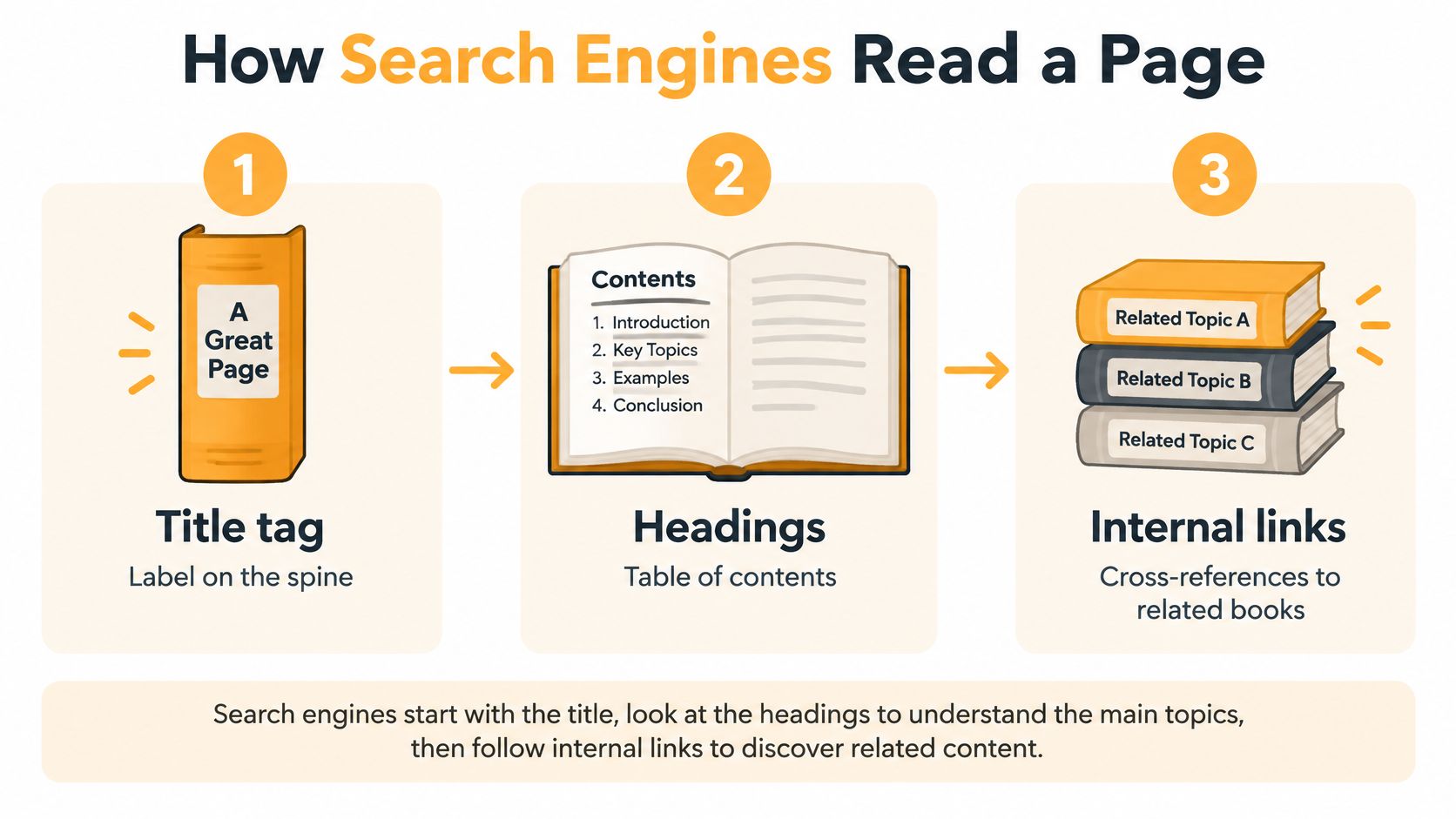
Think of a webpage as a library catalog card connected to a book. The title tag resembles the label on the spine, headings resemble the table of contents, and internal links act as cross-references to related books.
The analogy helps explain organization, but search engines don’t follow a rigid reading order. They gather signals from the page and its connections to understand what it offers.
This diagram illustrates those relationships.
Find, read, interpret, display
- Find: A crawler, the software that discovers webpages, follows accessible links to a URL. Use HTML
<a>links with a destination rather than relying solely on scripted button actions. - Read: The search engine processes the title, headings, visible text, images, and links.
- Interpret: It evaluates the topic and search intent, meaning the task the searcher wants to complete.
- Display: It selects how to represent the page in results, including a title and snippet.
Google’s SEO guidance recommends placing the words people search for in prominent, descriptive locations, including titles, main headings, alt text, and link text. Google may also construct its result title from headings and other visible text rather than copying the title tag exactly.
Test the page without its design
A service page labeled Services says little. A title such as Commercial HVAC Maintenance in Denver identifies both the offer and location.
Likewise, a navigation menu can look functional while relying on scripts that don’t expose crawlable destinations. Ask a developer to inspect its rendered HTML if important pages aren’t being discovered.
Read only your title, H1, and section headings. Could a stranger identify what the page offers and who it’s for? If not, clarify those signals before adding more keywords.
Writing Titles and Meta Descriptions That Earn Clicks
Your title tag names the page. Your meta description summarizes why someone should visit it. Together, they should make an accurate promise, not squeeze every possible keyword into a search result.
Say a product category has the title Shoes. Changing it to Trail Running Shoes for Wide Feet gives a shopper a specific reason to consider the page, provided the products match that description. Add the brand at the end when it doesn’t crowd out the useful information.
Write the offer before the brand
Use these rules when drafting:
- Put the topic first: Lead with the product, service, or question the page addresses.
- Differentiate the page: Don’t reuse a category title for every product or give unrelated service pages the same label.
- Keep it readable: Remove repetitive modifiers and unnecessary boilerplate.
- Check the destination: Every promise in the title should be easy to verify after clicking.
For more examples during an editorial review, Orchory’s SEO title tag best practices provides a focused companion resource.
Give the description a useful job
A description for that shoe category could read: Compare wide-fit trail running shoes by grip, cushioning, and terrain. Check available sizes and find the right fit for your next run.
That’s more informative than repeating best trail running shoes in slightly different forms. Include delivery terms, pricing, or availability only when the page supports them and someone maintains their accuracy.
Treat the description as a preview for the right customer, not a promise to every searcher.
The meta description isn’t a direct ranking input. Its practical job is to help someone decide whether the result fits their need, and Google may choose different page text for the snippet.
Select pages with substantial impressions in Search Console and weak click-through rate, the proportion of impressions that produce clicks. Rewrite their search previews, record the edit date, and compare similar queries and devices afterward. Don’t interpret a click-through change in isolation from changes in position or search demand.
Structuring Headings, Content and Internal Links
Answer the searcher’s task before expanding the topic. Someone asking how to clean a product needs instructions; someone comparing suppliers needs capabilities, constraints, and evidence. A page can mention the right keyword while delivering the wrong kind of help.
Use an outline to organize those needs before writing.
Make each section independently useful
Use a descriptive H1 for the main topic, H2 headings for major questions, and H3 headings for supporting details. An H2 such as Which Materials Can This Pump Handle? tells an industrial buyer more than More Information.
Answer that question immediately beneath the heading. Name the product or concept rather than opening with vague phrases such as This can help with that. Add specifications, examples, limitations, and evidence after the direct answer.
Original detail matters more than padding. Excellorix’s guide to unique SEO content can help distinguish useful contributions from rewritten summaries.
Connect text, links, and media
- Internal links: Connect readers to relevant supporting pages using descriptive anchor text, such as on-page SEO checklist, rather than click here. Also check for orphan pages, which have no incoming internal links.
- URLs: Prefer short, lowercase, hyphenated topic names over opaque parameter strings. Don’t change an established address casually; plan redirects when a change is necessary.
- Alt text: Describe what an informative image shows and why it matters in context. A useful example is Wide toe box on a trail running shoe. Give purely decorative images empty alt text.
AI retrieval is a secondary benefit, not a replacement for relevance and indexing. Separate the work into crawlability, retrieval clarity, and answer extractability: can a system access the page, identify the relevant passage, and quote it without losing essential context?
Google’s structured data introduction explains machine-readable descriptions, but adding markup doesn’t substitute for clear prose or establish an AI-citation benefit.
Highlight the opening paragraph beneath each H2. It should answer that heading without requiring the reader to reconstruct the rest of the page.
Page Speed, Mobile Experience and Structured Data
Does a page load quickly and work well on a phone? Mobile usability and speed affect whether visitors can read, interact with, and act on the content. Google’s mobile-first indexing announcement describes its rollout of mobile-first indexing, which uses the mobile version of content for indexing and ranking. Keep important text, headings, links, images, and structured data accessible on mobile.
Check the actual product or service page, not just a preview of its layout. Use the navigation, expand relevant details, and try the main conversion action. A page can fit a phone screen yet still frustrate visitors if buttons respond slowly or content shifts under their fingers.
Diagnose the delay before choosing a fix
Google’s Core Web Vitals guidance gives target thresholds for loading, responsiveness, and visual stability. These measures help turn “the page feels slow” into specific problems to investigate.
Core Web Vitals thresholds and main fixes
| Metric | Good threshold | Main fix |
|---|---|---|
| Largest Contentful Paint (LCP) | 2.5 seconds or less | Optimize the hero image and reduce render-blocking CSS and JavaScript |
| Interaction to Next Paint (INP) | 200 milliseconds or less | Split long JavaScript tasks and defer nonessential third-party tags |
| Cumulative Layout Shift (CLS) | 0.1 or less | Reserve dimensions for images, embeds, and promotional banners |
Heavy assets and blocking code can delay meaningful content. Long scripts may slow a button’s response, while late-loading banners can shift it just as a visitor taps. Use Search Console’s Core Web Vitals report and real-user measurements grouped by device and page template. Laboratory tests can help diagnose issues, but may not reflect every visitor’s connection or device. For WordPress sites, use this WordPress speed improvement guide to organize performance work.
Treat each change as a test: identify the slow page or interaction, record its current performance, make a focused fix, then check whether the page works better for visitors and supports the intended action.
Validate what the markup describes
Structured data should describe information visitors can see, such as product details, an article, or local business information. Don’t mark up ratings or offers that aren’t visible on the page.
Run eligible markup through Google’s Rich Results Test before publishing. Passing its technical checks means the markup may be eligible for enhanced results. It does not guarantee that Google will display one or that the page will generate more revenue.
Common On-Page Mistakes and How to Avoid Them
Most on-page mistakes are mismatches between what a page claims, what visitors receive, and what crawlers can access. Diagnose the visible symptom before choosing a fix rather than assuming every traffic decline is a keyword problem.
The contrast below is useful during an editorial review.
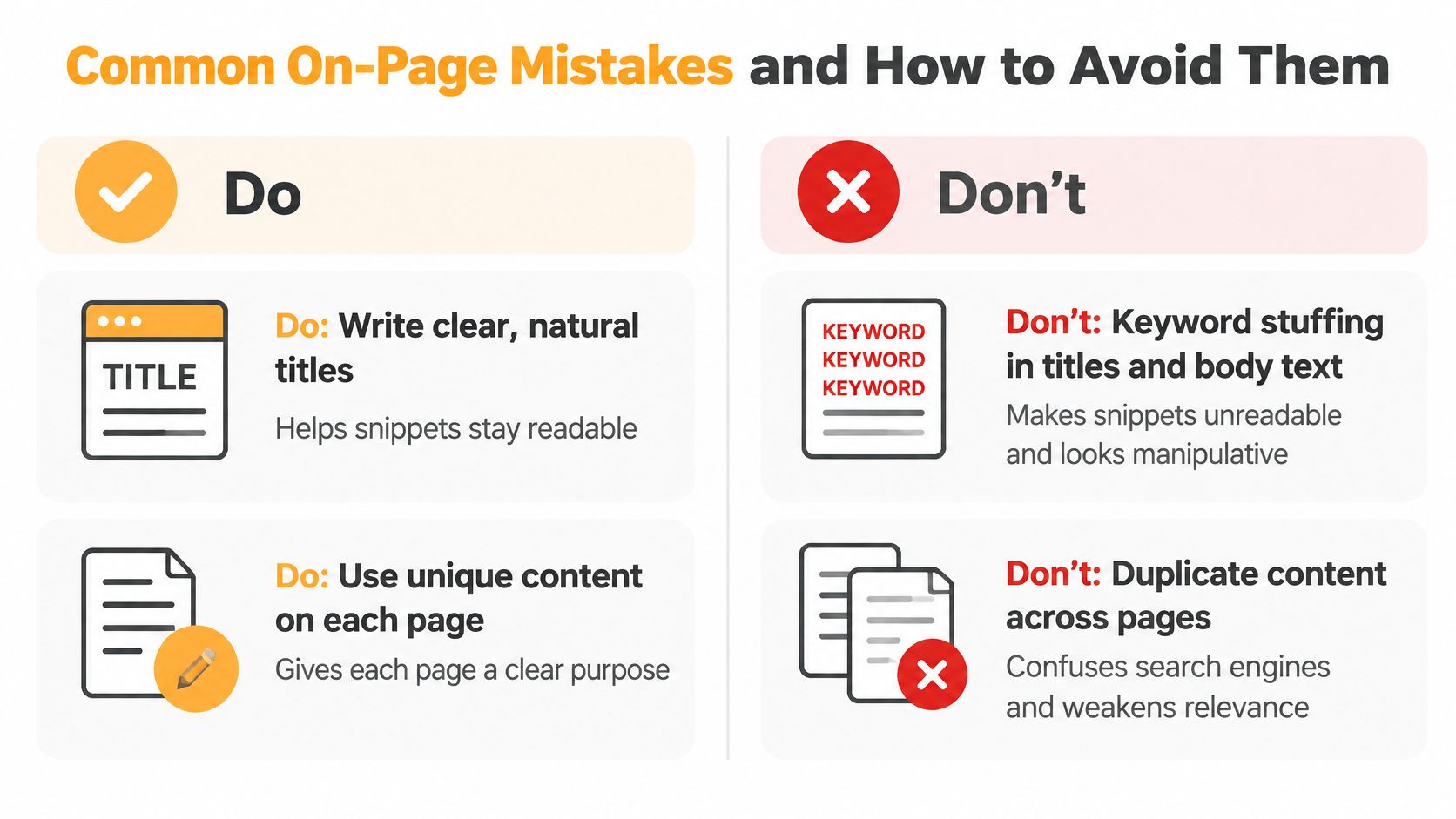
- Keyword stuffing: If the title or introduction sounds repetitive when read aloud, replace forced phrases with a clear description of the offer.
- Duplicate titles: If a crawl report shows indistinguishable product or filter titles, differentiate useful pages and review canonical URLs, which identify the preferred version of duplicate content.
- Overlapping thin pages: If similar URLs appear for the same query without serving distinct needs, consider consolidating them into a stronger resource and redirecting retired URLs.
- Inaccessible content: If essential details exist only inside images or unreliable scripts, expose them as readable rendered HTML; tabs themselves aren’t automatically a problem.
- Misused headings: If the page lacks a clear main heading or uses heading tags only for font size, establish a descriptive H1 and use styling controls for appearance.
- Weak internal links: If an important page is orphaned or linked only through vague text, add descriptive links from relevant pages.
- Misleading schema: If markup includes information absent from the page, correct or remove it before seeking validation.
Diagnostic caution: Low clicks are a symptom, not a diagnosis. Check the query, result appearance, position, and landing-page experience before editing.
Keep a short issue log with the affected URL, symptom, proposed fix, and owner. That prevents cosmetic changes from displacing problems that stop customers from finding or using a page.
Run an On-Page Audit on Your Top Pages
An audit becomes useful when each proposed change has a hypothesis, a baseline, and a business outcome. Google’s SEO fundamentals provides the foundation for reviewing discoverability and page presentation; your prioritization should also reflect commercial value.
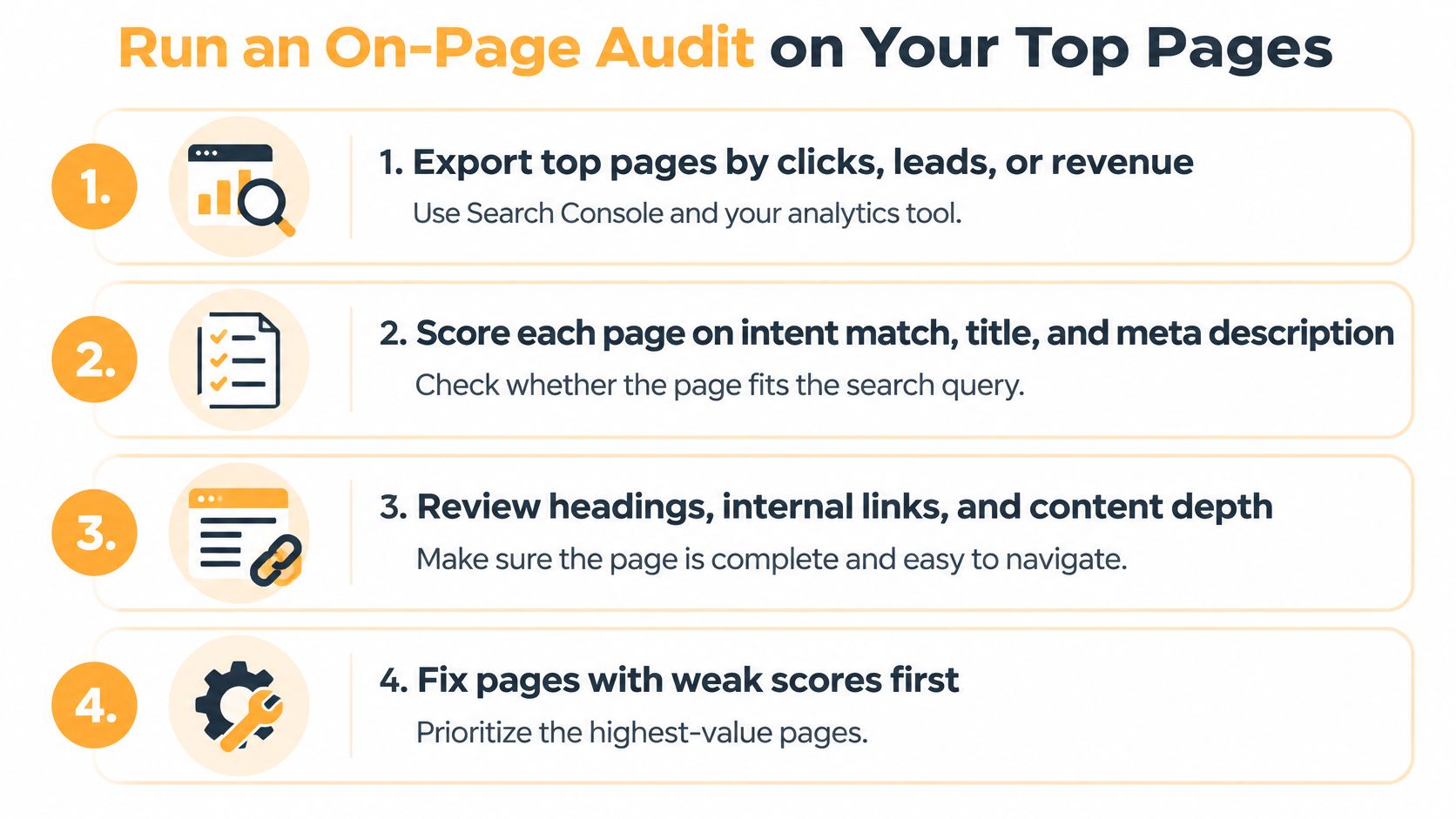
Use this visual as a review aid, then record the measurement details alongside it.
Turn findings into controlled changes
- Export priority pages. Use Search Console for clicks and impressions, then analytics for leads, purchases, and revenue.
- Score the experience. Review intent match, search previews, content, headings, internal links, performance, and schema accuracy.
- Rank the fixes. Consider commercial intent, indexation risk, expected visibility, and conversion value. A blocked product page deserves attention before optional markup.
- Record the hypothesis. For example: clarifying the service location should attract more relevant enquiries. Save the baseline and isolate that change where practical.
- Evaluate outcomes. Compare edited URLs over several months, accounting for seasonality, query mix, and other site changes. Judge schema implementation by observed results, not validation alone.
For editorial reviews, Blog Health App’s simple blog SEO audit checklist offers another practical reference. Pair content checks with Excellorix’s technical SEO audit checklist when access or indexing is uncertain.
Our initial process includes a full technical audit, keyword gap analysis, and competitor review. After implementation, we use Search Console data, ranking changes, and conversion performance to guide continued improvements.
On-page audit checklist
| Element | Target | Problem signal |
|---|---|---|
| Title tag | Unique, concise, primary topic first | Duplicate or truncated titles |
| Meta description | Accurate summary with a relevant reason to click | Impressions without expected qualified clicks |
| Headings | Clear main heading and logical supporting questions | Missing or confusing hierarchy |
| Body content | Direct answers supported by useful detail | Opening paragraphs that avoid the question |
| URL | Readable, topic-focused, hyphenated | Opaque parameters or duplicate versions |
| Image alt text | Contextual descriptions; decorative alternatives empty | Informative images without useful alternatives |
| Internal links | Relevant contextual links with descriptive anchors | Orphan pages |
| Schema markup | Visible-content match and valid implementation | Validation errors or unsupported claims |
| Core Web Vitals | Good real-user loading, responsiveness, and stability | Failing field measurements by device or template |
Excellorix offers a free SEO audit covering current rankings, traffic, technical foundations, and the competition if your team prefers an outside review.
Choose a commercially important page and identify the uncertainty you want to resolve before changing it. Visit Excellorix to start with a free SEO audit and turn content, structure, and performance findings into priorities tied to qualified traffic, leads, and revenue.