If you’re planning a new website or thinking about a redesign, you’ve probably found yourself comparing WordPress and Webflow. At first glance, both platforms seem capable of doing the same thing. Both can help you build a professional website, publish content, attract customers, and grow your business online. Yet once you go deeper into a WordPress vs Webflow comparison, the differences start to matter in ways that go beyond design or features.
At Excellorix, we’ve worked with businesses across different industries, and one thing is consistently clear. The best platform is not the one with the most features. It is the one that fits your business model, marketing strategy, and long term growth plans. If you’re trying to decide between WordPress and Webflow in 2026, this guide will help you understand which is actually the best website builder 2026 for your specific needs.
WordPress vs Webflow comparison: Core Difference Explained
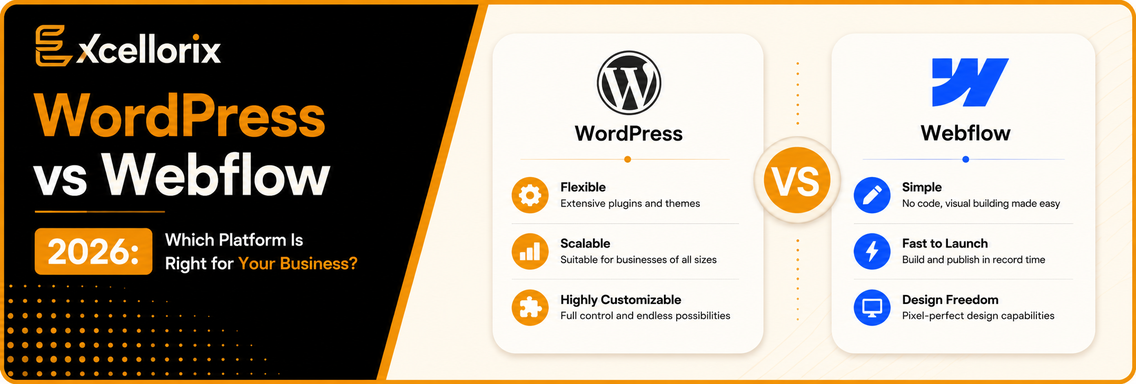
Before comparing features, it helps to understand the real difference between the two platforms. WordPress is built around flexibility and ownership. It gives you full control over hosting, functionality, integrations, and scaling. You are not locked into a closed ecosystem, which is why it powers a large portion of the internet. Webflow is built around simplicity and an all in one experience. It combines design, hosting, security, and content management into a single platform, which reduces technical overhead and makes website management easier.
When businesses search for Webflow or WordPress for business, they are usually trying to solve one of two problems. Either they want maximum control and scalability or they want simplicity and less maintenance. Both platforms are valid. The right choice depends on your growth direction.
What Is WordPress in 2026?
WordPress remains the most widely used content management system in the world, and its dominance is driven by one key factor: flexibility. It works for almost any type of website including service based businesses, ecommerce stores, blogs, SaaS companies, and lead generation websites.
One of its biggest advantages is scalability. A small website can evolve into a full digital ecosystem with booking systems, CRMs, memberships, advanced forms, and ecommerce functionality without rebuilding from scratch. This is why businesses investing in SEO services and long term content marketing often prefer WordPress. It supports structured content growth, which is essential for ranking and scaling organic traffic. For businesses focused on long term digital growth, WordPress often becomes the foundation of their online strategy.
What Is Webflow in 2026?
Webflow has grown quickly because it simplifies the entire website building process. Instead of managing hosting, plugins, updates, and security separately, everything is handled inside one platform. This reduces technical complexity and allows teams to focus more on design and marketing.
Webflow is especially popular among designers and startups because of its visual development system. It allows highly customized layouts without heavy reliance on developers. This is why many companies comparing Webflow or WordPress for business often choose Webflow when speed, simplicity, and design control are more important than deep customization. For brands that value aesthetics and fast execution, Webflow provides a smooth and efficient workflow.
WordPress vs Webflow for SEO
SEO is often the deciding factor when choosing a platform. A strong website is not just about appearance. It also needs to attract traffic from search engines. In a detailed WordPress vs Webflow comparison, WordPress still has an edge in advanced SEO flexibility. It allows full control over technical SEO elements such as schema markup, internal linking structures, site architecture, and plugin based optimization tools. This becomes especially important for websites that rely heavily on SEO services and content driven growth. Webflow also performs well for SEO. It provides clean code, fast loading structure, and built in SEO settings that work well for most business websites.
The difference becomes more noticeable when websites scale. WordPress handles large content ecosystems more effectively, especially for competitive industries.
Website Speed and Performance
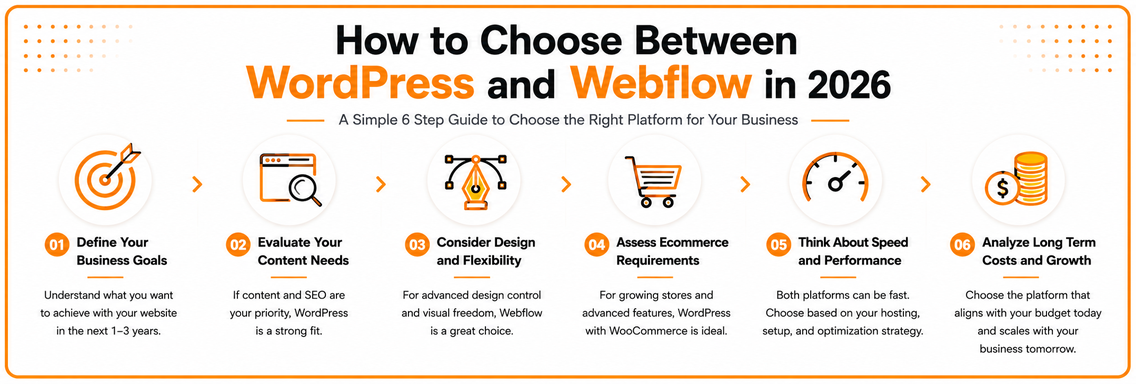
Speed is often misunderstood in this comparison. Many assume Webflow is always faster, but that is not entirely accurate. Webflow benefits from built in hosting and optimization, which ensures consistent performance across projects. However, WordPress performance depends heavily on how the site is built. Hosting quality, theme selection, image optimization, and plugin usage all play a major role. We have seen fast Webflow websites and slow ones, just as we have seen highly optimized WordPress websites that load extremely quickly.
Performance is less about platform and more about execution.
Design Flexibility and User Experience
Design is where Webflow stands out strongly. It offers advanced visual control that allows designers to build highly customized and interactive experiences without relying heavily on code. This makes it a strong choice for:
- Creative agencies
- Startups
- Personal brands
- Design focused businesses
WordPress can also achieve strong design results, but it often depends on themes, page builders, or custom development work. For businesses where branding and visual identity are a priority, Webflow often feels more intuitive. For businesses focused on marketing flexibility, WordPress often provides more long term adaptability.
Ecommerce Capabilities
Ecommerce needs vary depending on business size and complexity. Webflow ecommerce works well for small to mid sized stores with simple product structures and straightforward checkout flows. As ecommerce operations grow, complexity increases. This is where WordPress with WooCommerce becomes more powerful. It supports large catalogs, subscriptions, memberships, advanced shipping logic, and custom checkout experiences. For businesses planning long term ecommerce growth, WordPress often becomes the more scalable option.